


Every month-end, the same scene plays out in small businesses everywhere. Someone sits down to allocate shared expenses — rent split between departments, software used by multiple teams, shipping costs across product lines — and what should take 30 minutes stretches into days.
The spreadsheet opens. The formulas break. Someone changed the headcount mid-month. Marketing used more of that design software this month. The warehouse square footage got reconfigured. Now you're chasing down managers for usage reports, fixing broken formulas, and explaining to the CFO why the numbers don't match last month's pattern.
This isn't about complex accounting. It's the operational nightmare of tracking who uses what, when things change, and keeping it all straight without losing your mind. Most businesses try to solve this with increasingly complex spreadsheets that become impossible to maintain after about three months.
The hidden cost multiplication effect of bad allocation
Allocation problems are particularly nasty for small businesses because the errors compound in ways you don't see coming.
A marketing agency with 22 employees discovered their allocation mess was costing them around $2,800 monthly in misallocated expenses. Not because of fraud or major mistakes — just death by a thousand cuts. The office internet got split evenly instead of by actual headcount. Cloud storage costs went entirely to creative when account management used 40% of it. Project management software got dumped into overhead when it should have been client-billable.
Each mistake was small. Together, they completely distorted department profitability. The creative team looked unprofitable while operations appeared to run on air. This led to bad decisions: cutting creative resources while operations grew bloated, underpricing creative work, and missing that their most "profitable" service line was actually losing money once expenses were properly allocated.
The real damage happens when these misallocations drive strategic decisions. You end up optimizing the wrong things, cutting the wrong costs, and growing the wrong parts of the business.
Three allocation patterns that actually work in practice
After watching hundreds of businesses struggle with this, three patterns consistently work without becoming maintenance nightmares:
Stop losing track of your business spending.
Costyly helps you record, monitor & control expenses—accurately and efficiently.
- Automated expense categorization
- Real-time budget tracking
- Detailed financial reports
No credit card required
Headcount-based allocation
This works for truly shared resources where usage roughly follows team size. Office rent, general software licenses, basic IT infrastructure. You tag expenses with allocation rules based on department headcount ratios.
A 50-person consulting firm might split their $12,000 monthly office rent: Consulting (28 people) gets 56%, Sales (8 people) gets 16%, Operations (14 people) gets 28%. When headcount changes, the ratios update automatically if you've set up the right tagging system.
Usage-based allocation
For resources with measurable consumption. Cloud computing, shipping, specialized equipment time. You need actual usage data, not estimates.
An e-commerce business shipping three product lines tracks actual shipping costs per line rather than trying to allocate a monthly shipping bill. Their fulfillment software tags each shipment to a product line. No spreadsheet gymnastics needed — the data tells the story.
Fixed percentage splits
For stable, predictable shared costs where usage doesn't vary much month-to-month. Professional services, insurance, certain software subscriptions.
A design studio splits their Adobe Creative Suite costs 70/30 between client work and internal marketing. This ratio stays consistent for six months at a time. They review and adjust twice yearly rather than monthly.
Building allocation rules that don't break every month
The biggest mistake businesses make is creating allocation rules that require constant manual updates. Your allocation system needs to handle changes without breaking.
Start with clear allocation triggers. An expense comes in, and your system needs to know immediately how to handle it. This means setting up expense categories with built-in allocation rules, not trying to allocate everything manually after the fact.
| Expense Type | Allocation Method | Update Frequency | Data Source |
|---|---|---|---|
| Office Rent | Headcount ratio | Quarterly | HR headcount report |
| Cloud Services | Actual usage | Monthly | Usage reports from vendor |
| Shared Software | Fixed split | Semi-annual | Department agreement |
| Marketing Tools | Project tags | Real-time | Project codes on expenses |
| Shipping Costs | Direct attribution | Real-time | Order management system |
The key: match your allocation method to how stable the underlying driver is. Headcount doesn't change daily, so quarterly updates work. Cloud usage varies monthly, so you need monthly updates. Shipping happens per transaction, so you need real-time allocation.
Your tagging system becomes the backbone of this. Every expense needs clear tags that trigger the right allocation rule. "Office-Rent-Shared" triggers headcount allocation. "AWS-Computing-Usage" triggers usage-based allocation. "Adobe-Fixed-Split" triggers the 70/30 split.
Make tagging mandatory at the point of expense entry so rules trigger automatically and avoid month-end cleanup.
Your tagging system becomes the backbone of this. Every expense needs clear tags that trigger the right allocation rule. "Office-Rent-Shared" triggers headcount allocation. "AWS-Computing-Usage" triggers usage-based allocation. "Adobe-Fixed-Split" triggers the 70/30 split.
Why traditional expense tracking breaks allocation workflows
Most expense systems treat allocation as an afterthought. You enter an expense, then maybe add a note about splitting it. By month-end, you're hunting through notes trying to remember what goes where.
The operational reality: allocation needs to happen at the point of entry, not as a month-end exercise. When someone submits an expense, they should tag it properly, and the system should know immediately how to allocate it. Otherwise, you're just creating cleanup work for later.
A manufacturing company with three production lines learned this the hard way. They'd enter all expenses, then spend three days each month going back through to allocate shared costs. Half the time, the person doing allocation didn't know enough about each expense to allocate it properly. They'd guess, create errors, then spend another day fixing those errors.
The fix wasn't complicated — they needed expenses tagged properly when submitted. Production managers tag their own expenses. Facilities tags maintenance costs with location codes. IT tags infrastructure with department codes. The allocation happens automatically based on these tags.
The reconciliation nightmare nobody talks about
This is where allocation really falls apart: reconciliation. You've split everything perfectly in your spreadsheet. Then the credit card statement arrives and nothing matches.
The spreadsheet shows $3,000 allocated to marketing for software. The statement shows $3,500. Where's the extra $500? Someone upgraded a plan mid-month. Or added users. Or forgot to update the spreadsheet. Now you're playing detective, comparing line items, checking email receipts, bothering vendors for invoices.
This archaeology expedition happens every single month. The more complex your allocations, the worse it gets. A 40-person agency told me they spent 15 hours monthly just reconciling allocated expenses against actual statements. That's basically half a person's work week lost to matching numbers that should match automatically.
The solution isn't more complex spreadsheets. It's connecting your allocation system to your actual expense data. When an expense hits your credit card, it should already know how to allocate itself based on merchant, amount, and pre-set rules. When allocations happen in real-time as expenses flow in, reconciliation becomes a quick check rather than a forensic investigation.
Build an audit trail without the paper trail
Every allocation needs a clear trail showing who decided what and why. Not for compliance (though that matters) but for your own sanity when questions arise three months later.
"Why did facilities get charged $2,000 for software in March?" Without an audit trail, you're reading through old emails, checking Slack messages, maybe finding a spreadsheet comment if you're lucky. With proper tracking, you see immediately: "Allocated based on headcount ratio 60/40 as of March 1, approved by Operations Manager, based on Q1 headcount report."
Your audit trail needs:
-
Who made the allocation decision
-
What rule or method they used
-
When the allocation happened
-
Why (the business logic or trigger)
-
Supporting data (headcount report, usage data, etc.)
This doesn't mean lengthy documentation. A simple system that captures these elements automatically as allocations happen. Tag an expense with "Facilities-Headcount-Q2" and the system knows to apply Q2 headcount ratios and logs this decision.
When to actually automate vs when to keep it manual
Not everything should be automated. The trick is knowing which allocations benefit from automation and which need human judgment.
Automate these:
-
Recurring monthly expenses with stable allocation rules
-
High-volume transactions with clear allocation logic
-
Anything based on measurable data (usage, headcount, square footage)
-
Expenses where the allocation method doesn't change
Keep manual:
-
One-off purchases requiring judgment
-
Expenses where department ownership isn't clear
-
Anything where the business logic is still evolving
-
Shared expenses where fairness matters more than formula
A software company automated their cloud infrastructure allocation (clear usage data) but kept their conference sponsorship allocation manual (requires discussing value per department). They saved 20 hours monthly on the automated pieces while maintaining control over the judgment calls.
Who should definitely NOT try complex allocation
Some businesses make allocation worse by trying to be too precise. If you're under 10 people, splitting the coffee machine cost by department is pointless precision. If your shared expenses are under $5,000 monthly, the overhead of tracking might exceed the value.
A 6-person consulting firm spent hours monthly allocating $3,000 in shared expenses. The allocation changed their department costs by less than 2%. They switched to simple overhead allocation and got those hours back for actual client work.
Complex allocation makes sense when:
-
Department profitability drives real decisions
-
Shared expenses exceed $10,000 monthly
-
You have clear consumption differences between departments
-
The data exists to do it properly
-
Someone's compensation or budget depends on accurate allocation
If none of these apply, keep it simple. Not every business needs surgical precision in expense allocation.
The monthly allocation routine that actually sticks
The best allocation system runs mostly on autopilot with strategic check-ins. Here's a monthly routine that keeps allocations accurate without becoming a full-time job:
Week 1 of the month: Review any allocation exceptions from the previous month. Did anything fail to allocate? Were there new expense types that need rules? Takes about an hour.
Week 2: Update any usage-based allocations with fresh data. Pull usage reports, update ratios if needed. Another hour.
Week 3: Spot-check automated allocations. Pick 10 random allocated expenses and verify they went to the right place. 30 minutes.
Week 4: Run your reconciliation. With good automation, this becomes a quick variance check rather than line-by-line matching. Should take under 2 hours if your system is working.
Quarterly: Review and update allocation rules. Has headcount changed significantly? Do the fixed splits still make sense? Are new patterns emerging? This deeper review prevents drift and catches issues before they compound.
Here's a simple workflow diagram of the monthly routine and where automation should kick in.
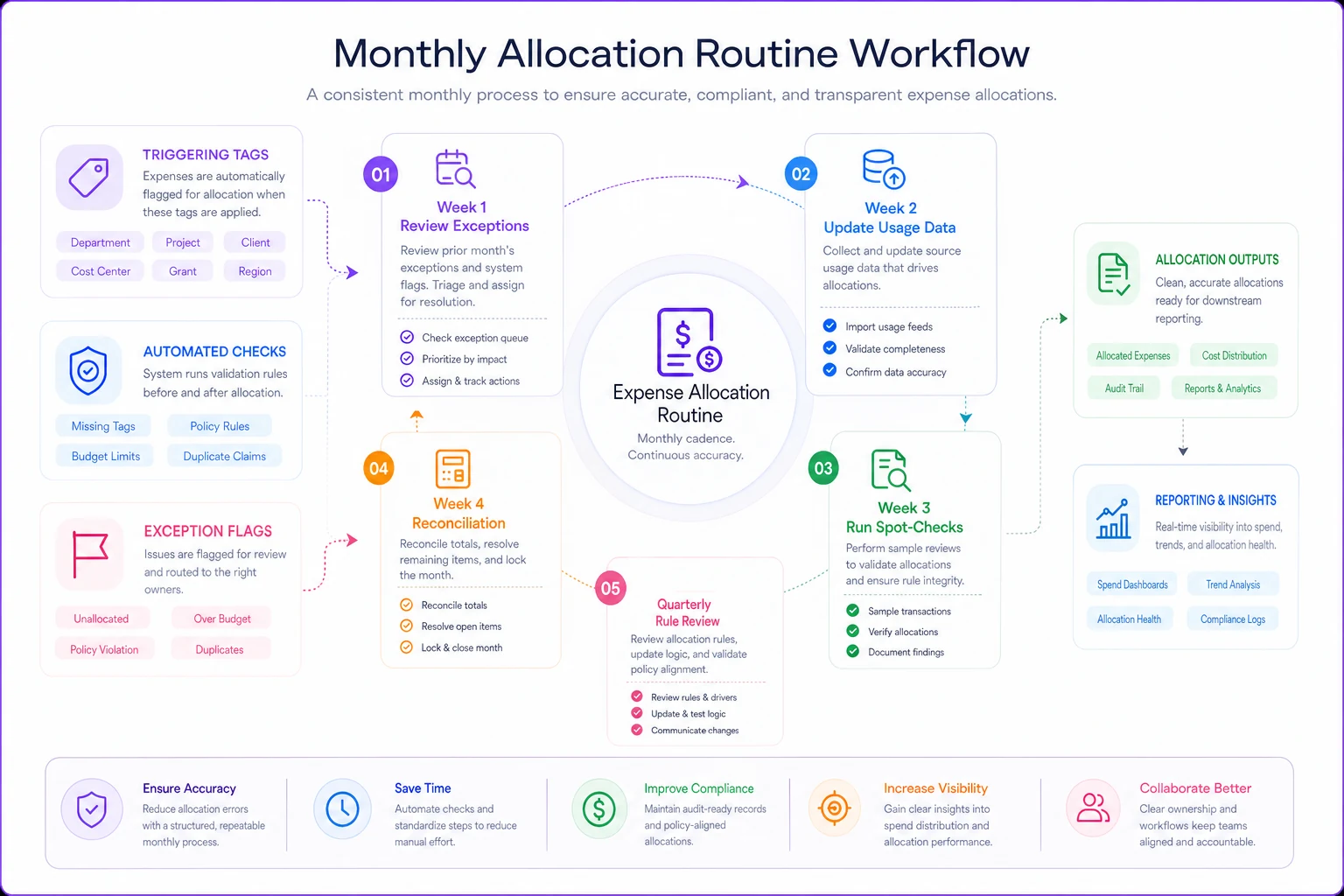
With that flow in place, month-end becomes oversight rather than reconstruction.
Turn allocation from a month-end scramble into background operations
The transformation happens when allocation stops being a monthly project and becomes part of daily operations. Expenses get allocated as they're entered. Rules apply automatically. Exceptions flag immediately for review. Month-end becomes a review, not a reconstruction project.
A regional retail chain with 8 locations and 100+ employees made this shift. They went from spending 5 days monthly on allocation to about 4 hours of oversight. The difference: expenses tagged at entry, rules that update automatically, and AI-powered software that catches anomalies before they become problems.
Their finance manager told me the biggest change wasn't the time saved — it was the confidence. "I know our department costs are accurate daily, not just hoping they're close after month-end allocation." This confidence translates into better decisions, faster course corrections, and departments that actually trust their numbers.
Modern expense management platforms can handle this complexity in the background. They learn your allocation patterns, suggest rules based on historical data, and flag when something looks off. It's not about replacing human judgment — it's about removing the mechanical work so humans can focus on decisions that matter.
The goal isn't perfect allocation. It's operational allocation that gives you directionally correct data without eating up your team's time. When you can allocate shared expenses accurately without spreadsheet gymnastics, you get back time for actually managing the business rather than just tracking it.
The businesses that thrive don't have more complex allocation systems. They have simpler ones that actually work, update automatically, and don't require a forensic accountant to maintain. That's the difference between allocation as a necessary evil and allocation as a strategic tool.
Ready to master your business expenses?
Join 5,000+ businesses using Costyly to save time, reduce overspending, and improve financial visibility.