



Most auto-categorization setups don't fail loudly. They fail slowly. A vendor changes their billing descriptor, a rule that used to catch 90% of Uber charges suddenly catches 40%, and nobody notices until the finance lead is manually recoding a quarter's worth of "Uncategorized" travel at month-end.
The problem isn't that rules are bad. It's that most teams treat rules like a one-time setup instead of something that needs testing, monitoring, and maintenance — the same way you'd treat any other system that touches your financials.
This is a maintenance guide, not a getting-started guide. If you already have some auto-categorize expenses rules running and you're tired of the misclassifications, this is for you.
The three rule types, and why mixing them causes most of the mess
Before you can maintain rules, you need to know what kind of rule you're actually writing. In practice there are three, and small teams tend to stack them in the wrong order.
Merchant rules match on the vendor or descriptor. "Anything from AWS → Cloud Infrastructure." These are the most reliable because merchants don't change constantly. But they break in specific ways: descriptor drift (AWS shows up as AMAZON WEB SERVICES, AWS EMEA SARL, and AWS*billing), and merchant sprawl (Amazon sells you office supplies, software, and a birthday gift for a client all under the same name).
Threshold rules match on amount. "Any single charge over $2,500 → route to CFO review" or "Anything under $15 at a restaurant → Meals, not Client Entertainment." These are useful for control, but terrible for categorization on their own. Amount tells you almost nothing about what something is.
Cardholder rules match on who spent the money. "Charges on the sales team's cards default to Travel & Client." This is the one people forget exists, and it's often the highest-leverage rule because context comes from the person, not the merchant.
The pattern that causes the most misclassification: teams write a pile of merchant rules, add a few threshold rules on top, and never use cardholder context. So a $40 Amazon charge from a developer (probably a book or a cable) gets coded the same as a $40 Amazon charge from the office manager (supplies). Same merchant, same amount, completely different category.
The fix is ordering and layering, not more rules.
| Rule type | Best for | Common failure | Reliability |
|---|---|---|---|
| Merchant | Recurring vendors, SaaS, known suppliers | Descriptor drift, multi-category merchants | High (until it isn't) |
| Threshold | Controls, review routing, flagging | Says nothing about category | Low for categorization |
| Cardholder | Adding context, defaulting by role | Breaks when roles change | Medium-high |
The fix is ordering and layering, not more rules.
How to layer rules so they stop fighting each other
The teams with clean books almost always run rules in a deliberate priority order, not a flat list. Flat lists are where conflicts hide — two rules both match, and whichever one the system happens to evaluate first "wins," which means your categorization depends on rule creation order. That's a mess.
Stop losing track of your business spending.
Costyly helps you record, monitor & control expenses—accurately and efficiently.
- Automated expense categorization
- Real-time budget tracking
- Detailed financial reports
No credit card required
-
Specific merchant + cardholder combinations first. "Amazon charges from the design team → Software/Assets." Most specific wins.
-
Merchant rules next. "Slack → Software."
-
Cardholder defaults after that. "Anything left on a sales card → Travel & Client."
-
Threshold rules last, mostly for flagging not categorizing. "Anything still uncategorized over $1,000 → hold for manual review."
-
Catch-all → Uncategorized, and route to a human.
Prioritize the most specific rule that safely captures a context (merchant+cardholder) before broader merchant or threshold rules.
The thing most people miss: your catch-all should be loud. If a charge falls all the way through to "Uncategorized," that's a signal your rule set has a gap, not just an inconvenience. Teams that silently auto-assign everything to a "Miscellaneous" bucket are hiding the exact information they need to improve their rules.
Test on historical data before you trust anything
This is the step almost everyone skips, and it's the one that separates rules that work from rules that feel like they work.
Before you turn a new rule on, run it backward against 3–6 months of already-categorized transactions. You're not looking at whether it fires — you're looking at whether it agrees with what a human already coded.
A typical example: you write a rule — "Any charge containing UBER → Ground Transportation." You run it against six months of history and find:
-
512 transactions matched the rule
-
468 were previously coded as Ground Transportation ✅
-
44 were previously coded as Meals (Uber Eats) ❌
That's an 8.6% misclassification rate, and now you know exactly why: UBER matches UBER EATS. Fix the rule to exclude EATS before it ever touches live data. Without the backtest, you'd find those 44 mistakes one painful correction at a time.
Two metrics worth tracking every time you test a rule:
-
Match rate — of the transactions you expected this rule to catch, how many did it actually match? Low match rate means descriptor variations you didn't account for.
-
Precision — of the transactions it matched, how many did it categorize correctly? Low precision means the rule is too broad.
Prioritize precision over match rate. A rule that catches 70% of charges correctly and leaves the rest for review is far better than one that catches 95% and gets 12% of them wrong. Wrong categorization is expensive to find and fix. An honest "I don't know" is cheap.
Monitoring rule drift after go-live
Rules decay. Not because you wrote them badly, but because the world underneath them moves. This is the part of maintenance nobody budgets time for.
What drift actually looks like in practice:
-
Descriptor drift. A vendor switches payment processors and their charge descriptor changes from
STRIPE*ACMEtoACME INC. Your merchant rule stops matching. Overnight, a vendor that used to auto-categorize now falls to Uncategorized. -
Volume drift. A rule that caught 30 transactions a month is now catching 300 because a team started using a new tool heavily. If that rule was slightly too broad, your error volume just multiplied.
-
Category drift. Your chart of accounts changed, someone renamed a category, and three rules now point at something that technically still exists but means something different.
The practical way to catch drift without staring at dashboards all day is to watch a small set of signals monthly:
A quick visual of the monthly monitoring loop looks like this.
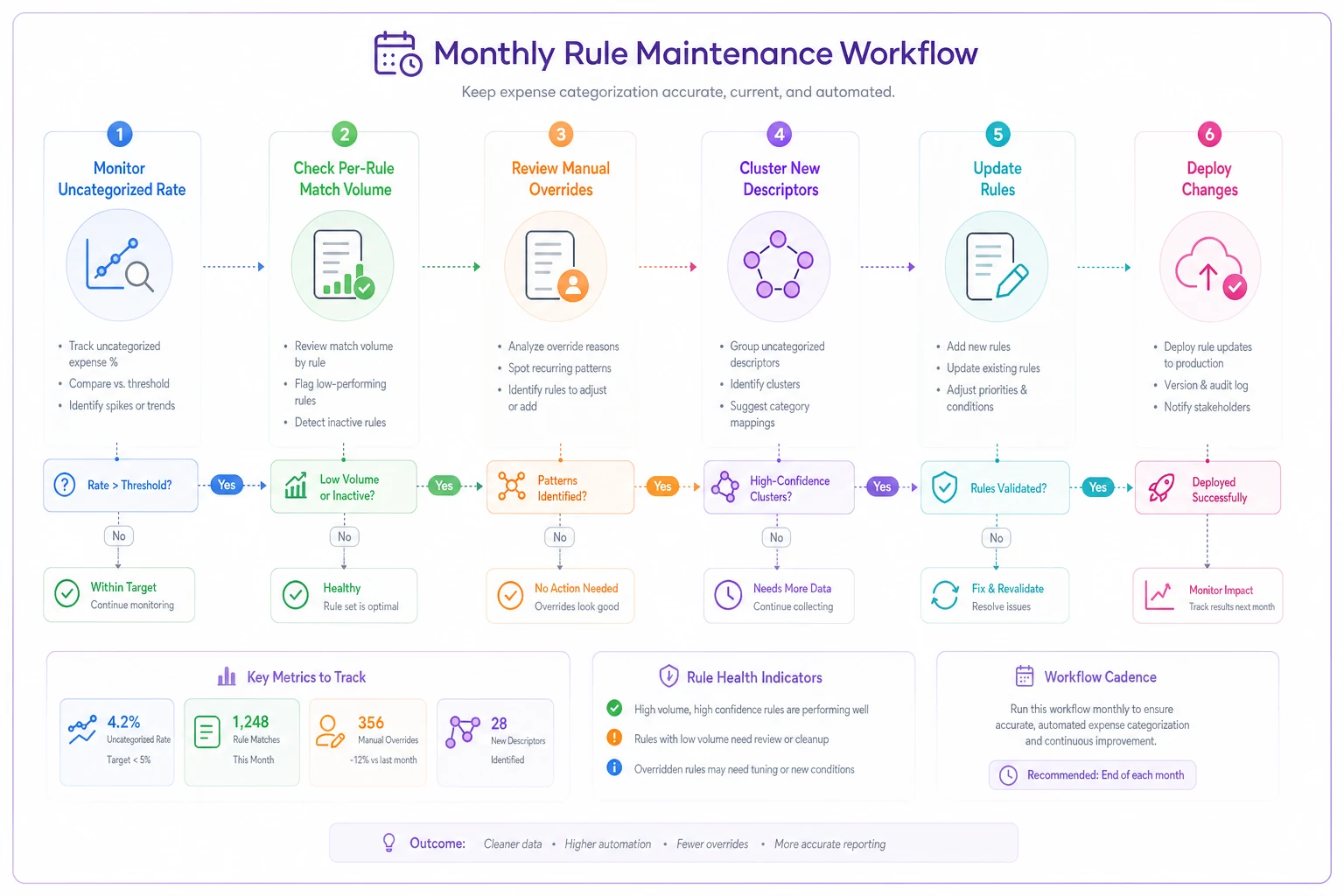
This is where an AI-assisted expense platform earns its keep quietly. Instead of you manually diffing merchant descriptors every month, the system can flag when a previously-matching vendor stops matching, cluster the new descriptor variants together, and suggest an updated rule. The point isn't to remove your judgment — it's to surface the drift before it becomes a month-end scramble. AI automation handles the "this pattern changed" signal across thousands of transactions long before a human would catch it.
Fallbacks: what happens when a rule fails
Every rule set needs a plan for failure, because failure isn't an edge case — it's a weekly event at scale.
Good fallback design has three layers:
Layer 1 — Graceful degradation to review, not to a wrong answer. When no rule confidently matches, the transaction goes to a review queue, not into a default category. Optimizing for "zero uncategorized transactions" as a vanity metric is a mistake. That number should never be zero if your rules are honest.
Layer 2 — Suggestion, not assignment. For low-confidence matches, the system proposes a category and asks a human to confirm. A good AI-assisted setup will say "this looks 72% like Software based on similar charges" rather than silently guessing. The human clicks approve, and that approval becomes training data for a better rule.
Layer 3 — Escalation for the expensive stuff. A $12 mystery charge can sit in review for a week without hurting anyone. A $9,000 mystery charge should ping someone the same day. Fallbacks should be proportional to the money at risk.
The teams that handle this well treat the review queue as a feedback loop, not a junk drawer. Every transaction that lands there is a candidate for a new or improved rule. Once you've manually coded the same weird vendor three months running, that's your cue to write the rule.
When aggressive auto-categorization is a bad idea
Not every situation calls for tight, high-coverage rules.
When it makes sense: You have repetitive, predictable spend — SaaS subscriptions, cloud infra, recurring suppliers, per-team travel. High volume, low variety. This is where rules pay off enormously.
When it's a bad idea: Your spend is highly varied, project-based, or client-billable in ways that depend on context a rule can't see. A consultancy where every expense needs to be tagged to a specific client engagement shouldn't lean hard on merchant rules — the same $200 flight means different things depending on the project. Cardholder rules plus a strong review habit will beat clever merchant logic here.
Who should not do this yet: If your chart of accounts is unstable or you're mid-cleanup, don't build a big rule set on top of shifting ground. You'll be maintaining rules that point at categories you're about to change. Stabilize the taxonomy first, then automate on top of it.
A real scenario
A 14-person marketing agency was running about 600–700 card transactions a month across two dozen vendors and a handful of one-off purchases. Their auto-categorization was a flat list of roughly 40 merchant rules, built once and never touched.
The symptom: month-end took the finance lead about a day and a half, mostly recoding travel and software that had "stopped working." Their uncategorized rate had drifted from single digits up to around 18% over six months.
When they backtested their rules against history, two things surfaced fast. First, three high-volume vendors had changed descriptors and quietly stopped matching — that alone accounted for most of the uncategorized pile. Second, their Amazon rule was dumping everything into Office Supplies, but roughly a third of Amazon spend was actually software or equipment bought by the design and dev teams.
The fix wasn't more rules. They added cardholder context (Amazon + dev team → Software/Assets), rebuilt the three broken merchant rules with the updated descriptors, and set a loud catch-all that routed anything unmatched to a review queue. Then they set a monthly 20-minute check on per-rule match volume.
After two billing cycles, uncategorized dropped back to roughly 5–7%, and month-end recoding went from a day and a half to a couple of hours. Nothing exotic — just testing, layering, and actually watching for drift.
The maintenance checklist
Run this monthly. It takes less time than the cleanup it prevents.
-
- [ ] Check the overall uncategorized rate vs. last month — investigate any jump
-
- [ ] Sort rules by match volume, flag anything that dropped or spiked sharply
-
- [ ] Review the manual override rate per rule; anything over ~5% needs attention
-
- [ ] Scan the review queue for repeat vendors that deserve a new rule
-
- [ ] Confirm no rules point at renamed or deprecated categories
-
- [ ] Spot-check 10–15 auto-categorized transactions for silent precision decay
-
- [ ] Backtest any new or edited rule against 3+ months before going live
Run this monthly. It takes less time than the cleanup it prevents.
The mindset that actually keeps books clean
The teams that win at this don't have smarter rules. They have a maintenance habit. They assume rules will drift, they test before they trust, and they treat the uncategorized pile as a signal instead of a failure.
Auto-categorization isn't a set-and-forget feature — it's a small system that needs the same light, regular attention as anything else touching your money. Get the layering right, backtest before you deploy, watch a few honest metrics each month, and build fallbacks that ask for help instead of guessing. Do that, and misclassification stops being the thing you dread at month-end and becomes a handful of edge cases you clean up in twenty minutes.
Auto-categorization isn't a set-and-forget feature — it's a small system that needs the same light, regular attention as anything else touching your money. Get the layering right, backtest before you deploy, watch a few honest metrics each month, and build fallbacks that ask for help instead of guessing. Do that, and misclassification stops being the thing you dread at month-end and becomes a handful of edge cases you clean up in twenty minutes.
Ready to master your business expenses?
Join 5,000+ businesses using Costyly to save time, reduce overspending, and improve financial visibility.