



Month-end expense reconciliation feels like trying to solve a puzzle where half the pieces are missing and the other half are from different boxes entirely. You've got receipts buried in email threads, bank transactions that make no sense, and approval requests scattered across Slack messages. Meanwhile, your bookkeeper is asking for everything by tomorrow morning.
The operational chaos that small teams face every month-end
The real problem isn't the mess itself—it's that most expense management systems assume you're either a solo entrepreneur who can track everything mentally or a Fortune 500 company with a dedicated finance department. Small teams of 5-20 people get stuck in this awkward middle space where manual tracking breaks down but enterprise solutions feel ridiculously over-engineered.
Working with businesses from marketing agencies to construction companies, you see the same pattern everywhere: expense management doesn't fall apart because people are careless. It breaks because the system was never designed to handle the natural chaos of business growth. What works fine when three people share one credit card completely implodes when you've got eight people submitting expenses across four different payment methods.
What works fine when three people share one credit card completely implodes when you've got eight people submitting expenses across four different payment methods.
Why traditional expense tracking breaks at exactly the wrong time
Most small teams hit the expense management wall somewhere between $30k and $80k in monthly spend. Below that, you can probably remember who bought what and why. Above it, transaction volume creates problems that multiply faster than you can solve them.
Stop losing track of your business spending.
Costyly helps you record, monitor & control expenses—accurately and efficiently.
- Automated expense categorization
- Real-time budget tracking
- Detailed financial reports
No credit card required
A marketing agency client discovered this painfully. They'd grown from 4 to 12 people over eighteen months. Their expense process looked reasonable: employees submit receipts, owner reviews weekly, bookkeeper reconciles monthly. But reality was messier.
Their creative director expensed client dinners without noting which client. The social media manager bought stock photos on three different platforms, making project cost tracking impossible. The operations manager approved recurring subscriptions that nobody remembered signing up for. By month-end, they'd burn 8-10 hours just figuring out what happened, forget about analyzing whether the spending actually made sense.
The breakdown follows a predictable pattern:
Receipt collection fails first. People forget to forward emails, lose physical receipts, or submit them weeks late. You end up with maybe 70% coverage on any given month, which means 30% of your spending is essentially invisible.
Approval confusion comes next. Who can approve what amounts? Does a $200 software subscription need the same approval process as a $200 client lunch? Without clear rules, everything either gets rubber-stamped or creates bottlenecks that slow down legitimate business needs.
Category chaos sets in next. One person codes Uber as "Transportation," another as "Client Entertainment," someone else leaves it blank. Your P&L becomes meaningless when similar expenses get scattered across eight different categories.
Finally, reconciliation turns into detective work. You're trying to match bank transactions from six weeks ago to receipts that may or may not exist, attempting to remember why someone spent $847 at Best Buy. Was it the new monitors? The conference room camera? Nobody knows.
The hidden cost cascade of broken expense workflows
Most businesses only track the obvious costs: time spent on reconciliation, late fees from missed payments, duplicate subscriptions that slip through the cracks. The real damage happens in ways that are harder to see but more expensive to fix.
Bad expense data corrupts every business decision downstream. Your project margins look healthy until you realize contractor payments got miscategorized. Marketing ROI seems fantastic because half the ad spend landed in "General Operating Expenses." You think you're saving money by cutting travel, but team dinners just started getting coded as "Meals" instead of "Team Building."
Trust erosion might be worse than the financial impact. When employees wait three weeks for reimbursement because receipts disappeared into someone's inbox black hole, they stop volunteering to pay for business expenses. When managers can't get straight answers about budget utilization, they either overspend from ignorance or underspend from fear.
A facilities management company went through exactly this spiral. Field technicians buying supplies daily, office staff managing vendor relationships, project managers handling client-billable expenses. Without a clear system, their month-end close stretched from 2 days to 5 days to eventually just staying permanently behind.
The owner seriously considered hiring a full-time finance person just to handle expense management. That's a $50k+ annual commitment to solve what's really a systems problem, not a staffing problem.
Building the five-part expense management framework
Component 1: Category taxonomy that answers real questions
Your expense categories need to map to questions leadership actually asks, not textbook accounting principles. Skip the standard chart of accounts and build categories around decision points that matter for your business.
-
Customer Acquisition (paid ads, lead generation tools)
-
Customer Retention (loyalty programs, success team tools)
-
Brand Building (content creation, design work)
-
Sales Enablement (CRM, demo tools, proposal software)
This way you can answer "What's our customer acquisition cost?" without spending three hours wrestling with Excel. Keep it to 20-30 categories total—enough detail to be useful, not so many that people start guessing randomly.
Component 2: Approval rules that actually get followed
Approval rules break when they're either too rigid (everything needs three signatures) or too loose (anything under $500 is automatic). The sweet spot uses graduated thresholds based on how risky the expense category is and how often it happens.
| Expense Type | Under $100 | $100-500 | $500-2000 | Over $2000 |
|---|---|---|---|---|
| Recurring Software | Auto-approve | Manager | Manager | Owner |
| Client Billable | Auto-approve | Auto-approve | Manager | Manager |
| Equipment | Manager | Manager | Owner | Owner |
| Travel | Auto-approve | Manager | Manager + Finance | Owner |
| Contractors | Manager | Owner | Owner | Owner + Finance |
Notice how client-billable expenses get more flexibility—you don't want approval delays messing with revenue generation. Contractor expenses need tighter control since they can spiral out of control quickly.
Component 3: Receipt policy that matches reality
"Keep all receipts" is wishful thinking. "Keep no receipts" is asking for tax audit trouble. Build a policy around documentation value, not documentation theater.
-
For transactions under $25
Bank transaction is sufficient
-
For transactions $25-75
Bank transaction plus expense note
-
For transactions over $75
Receipt required
-
For recurring subscriptions
Receipt on first purchase only
-
For client entertainment
Receipt plus attendee list
-
For travel
Receipt plus business purpose
This cuts way down on receipt chasing while keeping you audit-safe. Most small business receipts under $25 are coffee, parking, and basic supplies—tracking every $3.50 latte creates more work than it's worth.
Component 4: Reconciliation cadence that prevents pile-ups
Monthly reconciliation is fantasy. By month-end you're staring at 200-400 transactions trying to remember what they were for weeks later. The answer isn't daily reconciliation (nobody has time) but strategic checkpoints.
-
Weekly quick-match (15 minutes)
Handle obvious recurring charges, flag anything weird
-
Mid-month deep-dive (45 minutes)
Sort out flagged items, check receipt completion
-
Month-end wrap-up (60-90 minutes)
Final categorization, run reports, analyze what happened
This approach means you're never more than two weeks behind on any transaction. Problems get caught while people still remember what actually happened.
Automate rule-based categorization for recurring subscriptions to reduce weekly matching time.
Component 5: KPIs that drive behavior change
Most expense metrics focus on total spending, which tells you nothing about whether your process is working. Better metrics give you visibility into system health and spending patterns.
Weekly tracking:
-
Receipt capture rate (receipts submitted / transactions over $75)
-
Approval velocity (average time from submission to approval)
-
Uncategorized transaction percentage
Monthly tracking:
-
Spend per employee by category
-
Budget variance by department
-
Vendor concentration (percentage of spend with top 5 vendors)
-
Project margin after allocated expenses
When receipt capture drops below 80%, you know reconciliation will be a nightmare. When approval velocity hits 3+ days, reimbursements will be late and people will get frustrated. These leading indicators let you fix problems before they cascade.
The month-end workflow that actually works
[WORKFLOW GRAPH PLACEHOLDER: Show weekly expense management workflow with decision points for categorization, approval, and reconciliation]
Here's a simple visual to map the weekly checkpoints and decision points.
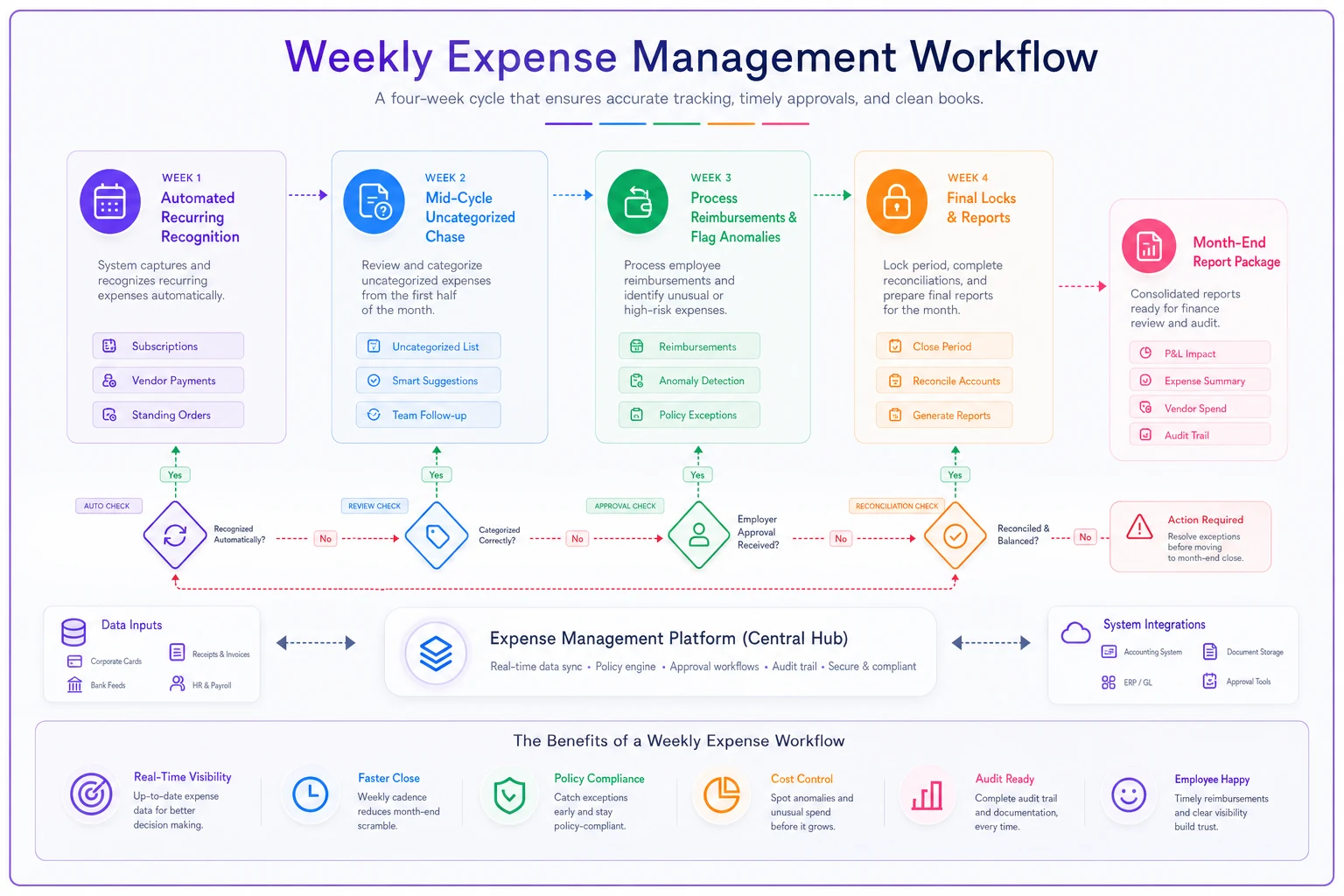
Week 1 (Days 1-7) Start clean with automated recurring charge recognition. Software subscriptions, rent, insurance—all the predictable stuff gets categorized automatically based on last month's rules. Review new vendors and set up categorization rules for next month. Takes about 30 minutes on the first Monday.
Week 2 (Days 8-14) Mid-cycle checkpoint. Pull the uncategorized transaction report and chase down mysteries before memories fade. Check receipt completion for anything over $75. Send polite reminders for missing documentation. Budget 45 minutes on the second Wednesday.
Week 3 (Days 15-21) Heavy lifting week. Process pending reimbursements, review department spending against budgets, flag unusual patterns. This is when you catch the accidentally-doubled software subscription or the vendor who raised prices without warning. Plan for 60-90 minutes on the third Wednesday.
Week 4 (Days 22-31) Final push. Lock categories for all transactions, run variance reports, prepare the executive summary. The actual "close" should take under 2 hours because you've been maintaining instead of catching up.
Month-End Report Package
-
P&L by category with variance explanations
-
Department spending vs budget
-
Project profitability after expenses
-
Vendor spend analysis
-
Next month's projected recurring charges
This rhythm keeps you within a week of current on expenses. Month-end becomes a summary exercise rather than an archaeological expedition.
Common failure points and recovery patterns
The New Hire Tsunami
Each new employee adds 10-15 transactions monthly. Hire three people at once and your categorization system gets overwhelmed.
Recovery strategy: Build a "new employee expense template" with the 20 most common charges pre-categorized. Review their first month's expenses together to establish patterns. This prevents confusion and establishes good habits early.
The Audit Panic
Tax season hits and suddenly you need documentation from eight months ago.
Recovery approach: Run a "receipt gap analysis" quarterly—flag any transaction over $75 without documentation for follow-up while memories are still relatively fresh. Don't wait until audit season when memories have completely faded.
The Category Creep
Someone creates a new category for every slightly different expense. Soon you have "Meals," "Team Meals," "Client Meals," "Working Meals," and "Conference Meals." Your reporting becomes useless.
Recovery method: Quarterly category cleanup. Merge similar categories, delete unused ones, stick to that 20-30 category target. Better to have broader categories that capture everything than narrow ones that create confusion.
The Approval Bottleneck
The owner wants to approve everything, then travels for a week. Expenses pile up, reimbursements delay, resentment builds.
Recovery fix: Set up approval delegation rules—assign backup approvers, or auto-approve certain categories under specific thresholds. The business can't stop when one person is unavailable.
Technology integration without complexity overwhelm
The right software makes this system almost run itself. Most small businesses either use nothing (spreadsheet chaos) or everything (seven different tools that create more problems).
The minimal viable stack:
-
Bank feed integration for automatic transaction import
-
Receipt capture via email forwarding or mobile app
-
Approval workflow with mobile notifications
-
Automatic categorization rules that learn from patterns
-
Real-time dashboard for spend visibility
Skip enterprise expense platforms built for 500+ employee companies. You'll spend more time configuring than saving. Also avoid ultra-simple receipt scanning apps that don't connect to your actual workflows.
The sweet spot is operational software that handles expense management as part of your broader business system, not a standalone island. When expense data flows naturally into project profitability, client billing, and financial reporting, the system maintains itself through daily use rather than requiring dedicated babysitting.
Scaling considerations as your team grows
What works for 8 people starts creaking at 15 and completely breaks at 25. Plan evolution points ahead of time.
At 10-15 people: Add department-level approval hierarchies. Marketing Manager approves marketing expenses up to $1,000, then escalation kicks in. This distributes approval load while keeping control.
At 15-25 people: Implement cost center tracking. Each project or department gets a budget code. Expenses need both category and cost center, enabling real profitability analysis.
At 25+ people: Consider dedicated expense cards with built-in controls. Real-time transaction feeds eliminate receipt chasing. Preset spending limits prevent surprises. Individual cards make accountability crystal clear.
Make these changes before the system breaks, not after. When you notice reconciliation taking 20% longer each month, that's your signal to evolve.
The compound benefits of systematic expense management
A working expense management system does way more than just speed up month-end close. It changes how the business operates day-to-day.
Managers make better decisions when they can see real-time budget utilization. Instead of guessing whether they can afford a new tool, they check the dashboard and know instantly.
Projects become more profitable when all costs get captured accurately. That client project that looked like a 40% margin winner might actually be breaking even once you allocate the real expenses.
Employee satisfaction improves when reimbursements happen quickly and predictably. People stop hesitating to spend money on legitimate business needs. The conversation shifts from "Can I expense this?" to "Does this create value?"
You get your time back. Those 10-15 hours spent on month-end fire drills can go toward growth activities. The mental energy previously wasted worrying about expense chaos can focus on strategic decisions.
Making the system stick
The best expense management system is worthless if nobody follows it. Implementation success comes down to three things: simplicity, visibility, and consistency.
Start with just the receipt policy and category taxonomy. Get those working for a full month before adding approval rules. Layer in the KPIs once basic workflow is stable. This prevents overwhelming the team with too much change at once.
Make the system visible. Put the expense dashboard on a TV in the office. Send weekly summaries showing receipt capture rates and approval velocities. Celebrate when month-end close happens in under 2 hours. Visibility creates accountability, accountability creates habits.
Stay consistent even when it's tempting to make exceptions. The moment you let someone skip receipt submission or bypass approval rules, the system starts eroding. Better to adjust the rules officially than allow unofficial workarounds.
The path from expense chaos to systematic control isn't about perfect documentation or complex approval hierarchies. It's about building a framework that matches how your small business actually operates, then evolving it as you grow. When expense management becomes a background process instead of a monthly crisis, you've freed up the time and mental clarity to focus on what actually drives your business forward.
Ready to master your business expenses?
Join 5,000+ businesses using Costyly to save time, reduce overspending, and improve financial visibility.