


Every month, the same charges roll through your business accounts. Office rent. Software subscriptions. Insurance premiums. Utility bills. Marketing platforms. Yet most small businesses still manually match these predictable expenses to budget lines, burning hours on work that should take minutes.
The problem compounds when you're managing 40+ recurring vendors across multiple payment methods. Credit cards auto-renew subscriptions you forgot existed. ACH pulls hit on different days each month. Some vendors change their merchant names quarterly. Meanwhile, your bookkeeper spends three days each month playing detective with bank statements, trying to remember if "GOOG*GSUITE_domain" belongs under Software or Marketing.
After working with hundreds of small businesses on this exact workflow, one pattern becomes obvious: businesses that map recurring charges once and let rules handle the rest save 8-12 hours monthly on expense categorization alone. Building those rules requires understanding your actual transaction patterns first, not just guessing based on vendor names.
Why recurring charges become a categorization nightmare
Small business transaction data gets messier than anyone expects. A typical 50-employee company processes around 180-220 recurring charges monthly across all payment methods. These charges rarely arrive with clean, consistent naming.
Take a standard AWS charge. Depending on your payment processor and bank, it might appear as:
-
AMAZON WEB SERVICES
-
AWS*METERING.1234
-
AMAZON.COM SVCS WA
-
AMZ*WebServices
Each variation needs its own recognition rule, or your automated categorization fails. Multiply this across every vendor, and suddenly you're managing 500+ rule variations just to catch your recurring expenses.
The timing problem makes everything worse. Most businesses assume recurring charges hit on consistent days. Reality check: only about 60% of subscription charges actually process on their stated billing date. Payment processors batch transactions. Banks delay posting. Weekends push charges to Monday. Your "first of the month" rent might post anywhere from the 28th to the 5th.
Then there's the amount variance issue. That $99 monthly software subscription? It might charge $98.91 one month due to tax adjustments, $102.40 the next month after a regional fee update, then back to $99. Your recognition rules need enough flexibility to catch these variations without accidentally grabbing unrelated charges.
Start with transaction archaeology
Before writing a single recognition rule, you need three months of clean transaction history. Not summarized reports — the raw, ugly transaction feeds from every payment source. Bank accounts, credit cards, PayPal, ACH processors, everything.
Stop losing track of your business spending.
Costyly helps you record, monitor & control expenses—accurately and efficiently.
- Automated expense categorization
- Real-time budget tracking
- Detailed financial reports
No credit card required
Export these transactions into a single worksheet. Don't try to clean the data yet. You're looking for patterns in the chaos.
Create columns for:
-
Transaction date
-
Posted date
-
Merchant name (exactly as shown)
-
Amount
-
Payment method
-
Your manual category (if already tagged)
Sort by merchant name and scan for variations. You'll spot clusters immediately. Those seven different AWS descriptions all represent the same monthly infrastructure bill. The "ZOOM.US 888-799-9666" and "ZOOM SUBSCRIPTION" entries are both your video conferencing platform.
Group these variations together. Create a "Canonical Vendor Name" column where all AWS variations become "Amazon Web Services" and all Zoom variations become "Zoom Video."
Next, analyze the timing patterns. Filter to show just one vendor across three months. Note the transaction dates. If your Zoom subscription shows dates of January 3rd, February 3rd, and March 5th, you've identified a "monthly on the 3rd" pattern with a 2-day variance window.
The amount analysis reveals the tolerance you need. Calculate the variance between the highest and lowest charge amount for each vendor over three months. Most legitimate recurring charges vary less than 5%. Anything beyond 10% variance usually signals either a usage-based component or multiple subscription tiers getting mixed together.
Keep the raw feeds intact until after you've identified patterns — cleaning too early hides variations.
Here's a simple workflow you can follow while doing this archaeology.
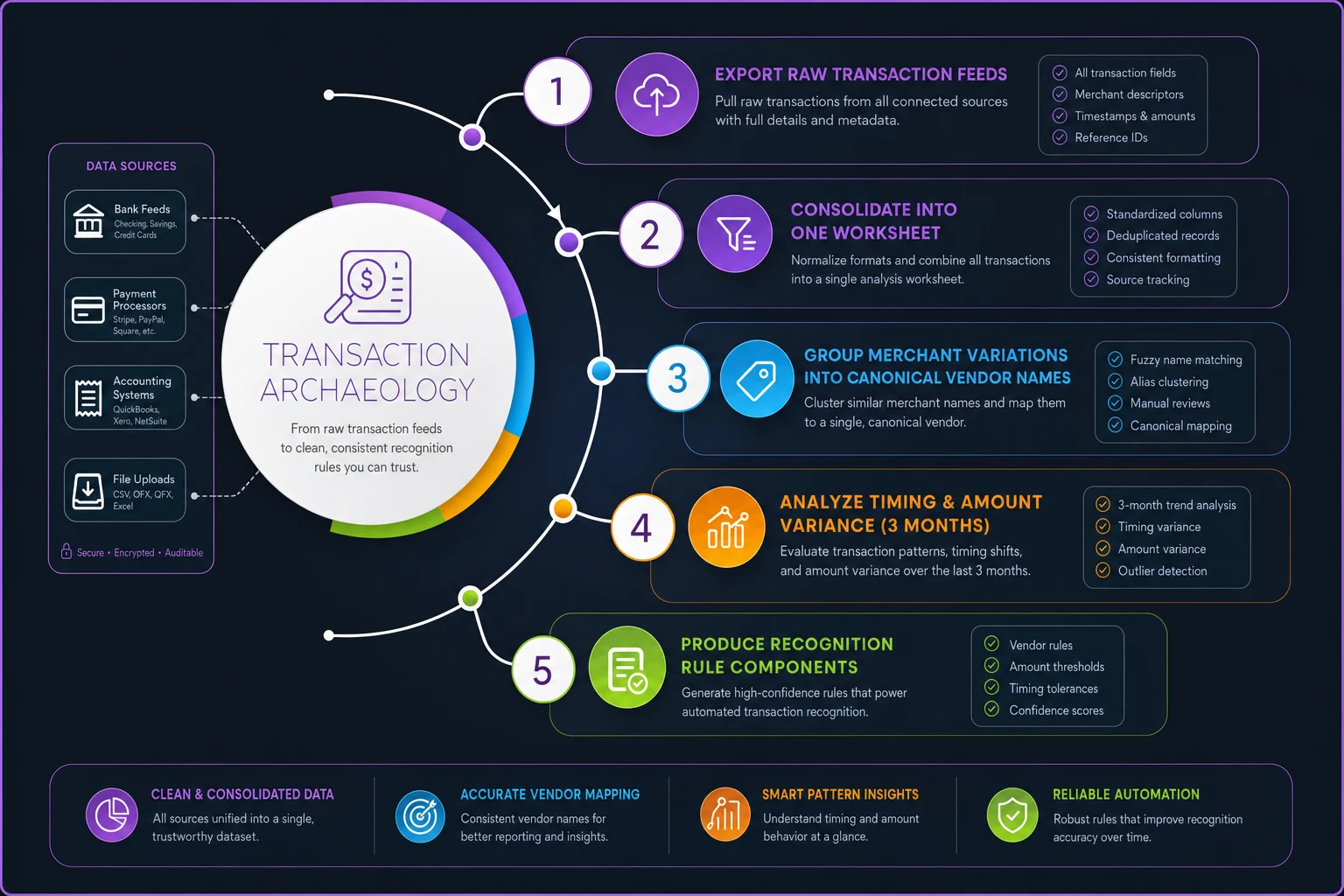
Use that workflow as a checklist while you analyze three months of data.
Build recognition rules that actually work
Recognition rules fail when they're too rigid or too loose. The sweet spot catches every legitimate recurring charge without false positives.
Start with this framework for each vendor:
Merchant name patterns: List every variation you found, using wildcards for variable portions. "AWS*" catches all AWS variants. "ZOOM" without wildcards catches both "ZOOM.US" and "ZOOM SUBSCRIPTION."
Amount range: Set your range at the historical variance plus 3%. If Salesforce charged between $3,000 and $3,150 over three months, set your rule for $2,900 to $3,250. This handles small price increases without breaking.
Frequency window: Define the expected interval and acceptable variance. "Monthly between day 1-5" or "Quarterly on the 15th ± 3 days."
Payment method: Lock rules to specific payment methods when possible. Your rent only comes through ACH. Your software subscriptions hit the company credit card. This prevents false matches.
Here's what a complete rule looks like for a typical SaaS subscription:
| Rule Component | Value |
|---|---|
| Vendor Name Pattern | "SLACK" OR "SLACKHQ" |
| Amount Range | $750 - $850 |
| Frequency | Monthly, days 10-14 |
| Payment Method | Corporate Amex ****4521 |
| Budget Line | Software > Communication Tools |
| Tag | Recurring, Essential Service |
Well-crafted rules handle edge cases automatically. When Slack charges $823 on the 13th instead of the usual $800 on the 11th, your rule still catches it.
Map to budget lines without ambiguity
Every recognition rule needs a clear destination in your budget structure. This sounds obvious until you realize most small businesses have overlapping categories that create confusion.
Where does Canva go — Marketing or Software? Is DocuSign under Legal or Operations? These edge cases multiply until half your rules dump into generic "Other" categories, defeating the entire purpose.
The fix: create specific subcategories for recurring charges. Instead of just "Software," use:
-
Software > Productivity Tools
-
Software > Development Infrastructure
-
Software > Marketing Platforms
-
Software > Financial Systems
This granularity eliminates the guesswork. Canva automatically flows to Marketing Platforms. AWS lands in Development Infrastructure. No human judgment required.
You also need fallback rules for when primary rules fail. If a charge resembles AWS but falls outside your amount range, where should it go? Create a secondary rule that catches "AWS*" at any amount and routes it to "Software > Unclassified for Review."
Your rules hierarchy should follow this pattern:
-
Exact match rules
Specific vendor + amount range + frequency
-
Vendor-only rules
Catches unusual amounts from known vendors
-
Category patterns
"INSURANCE*" → Insurance, regardless of vendor
-
Fallback rules
Unmatched recurring patterns → Review queue
About 15% of your recurring charges will defy clean categorization. They're the weird ones — annual payments that process in random months, vendors that bundle multiple services into single charges, or those frustrating platforms that process through third-party payment providers.
Don't force these into rules. Flag them for manual review. It's better to handle five manual categorizations monthly than to have broken rules polluting your entire expense flow.
Test against historical data before going live
Never deploy recognition rules straight to production. Your historical data becomes the perfect testing ground.
Take your last three months of categorized expenses — the ones you manually tagged. Run your new rules against this data and compare the results. You're looking for two failure types:
False positives: Rules that grabbed charges they shouldn't have. That AWS rule accidentally catching an Amazon office supplies purchase. The insurance rule grabbing an unrelated charge that happened to include "INSURANCE" in the memo field.
False negatives: Legitimate recurring charges your rules missed. The Zoom charge that processed through PayPal instead of directly. The monthly parking that shows up as "CITYPARK*MONTHLY" instead of your expected "CITY PARKING."
Build a confusion matrix to track accuracy:
| Metric | Target | Actual |
|---|---|---|
| Correctly matched recurring charges | 95% | 89% |
| False positives (incorrect matches) | <2% | 4% |
| False negatives (missed charges) | <5% | 7% |
| Processing time per 100 transactions | <30 seconds | 18 seconds |
When you spot mismatches, resist the urge to immediately adjust rules. First, determine if the mismatch represents a real pattern or a one-off anomaly. That Zoom charge through PayPal might have been a one-time billing error. Don't create a rule for something that won't repeat.
The validation that actually matters: can your rules handle next month's charges? Take your rules and manually predict what they'll categorize next month. When the actual charges arrive, compare against your predictions. This forward-testing catches problems that historical testing misses.
Monitor variance without drowning in alerts
Once your rules run in production, you need variance monitoring that flags real problems without crying wolf over normal fluctuations.
Set up three levels of variance alerts:
Level 1 - Amount variance exceeds 10%: Your usual $500 software subscription charges $550. Could be a price increase or added seats. Requires investigation but not urgent.
Level 2 - Timing variance exceeds 5 days: Your rent usually posts on the 1st but hasn't appeared by the 6th. Might indicate a payment failure or processing delay.
Level 3 - New recurring pattern detected: A charge appears three months in a row but matches no existing rules. Probably a new subscription that needs rule creation.
Don't alert on everything. A 2% price increase on a $20 subscription doesn't warrant an email. Focus alerts on material variances that actually impact your budget.
Create a monthly variance report that shows:
-
Rules that caught fewer charges than expected
-
Rules that caught more charges than expected
-
Average amount variance by vendor
-
New recurring patterns detected
-
Rules with highest false positive rates
This report becomes your rules maintenance checklist. That AWS rule catching too many false positives needs tightening. The insurance rule missing charges needs its amount range adjusted.
Real-world example: Marketing agency streamlines recognition
A 12-person marketing agency dealt with 67 recurring software subscriptions across creative tools, project management, analytics platforms, and client services. Their bookkeeper spent two full days monthly just categorizing these predictable charges, often making mistakes when vendor names changed slightly.
They extracted four months of transaction history and found 340 unique merchant name variations for their 67 actual vendors. Adobe Creative Cloud alone showed up as eleven different merchant names depending on which product bundle and payment method processed the charge.
After building recognition rules using the pattern discovery method, they achieved:
-
94% automatic match rate on recurring charges
-
5 hours monthly reduced from manual categorization
-
3% error rate (down from 12% with manual matching)
They discovered that 20% of their "monthly" subscriptions actually processed on irregular schedules. Some charged every 28 days, gradually shifting dates. Others skipped months randomly due to failed payment retries. Their rules needed date ranges, not fixed dates.
When automation makes sense (and when it doesn't)
Not every business benefits equally from automated recurring charge recognition. The effort pays off when you have more than 30 recurring vendors or when your manual categorization takes more than 4 hours monthly.
Businesses that shouldn't automate yet:
-
Under 20 recurring charges monthly
-
Vendors that change frequently (high churn)
-
Primarily usage-based billing (varies wildly)
-
No consistent categorization structure yet
Businesses where automation transforms operations:
-
50+ recurring vendors
-
Stable vendor relationships
-
Multiple people involved in expense categorization
-
Need for real-time budget variance tracking
-
Growing rapidly and adding subscriptions monthly
The implementation sweet spot hits around 40-60 recurring charges. Below that, manual work stays manageable. Above 100 charges, you probably need more sophisticated spend management software that includes built-in pattern recognition.
Moving from reactive to proactive expense management
Most small businesses discover recurring charge problems after they've already impacted budgets. An unnoticed price increase compounds for six months. A forgotten subscription renews annually. Duplicate services overlap because nobody tracked what was already purchased.
Pattern-based recognition flips this dynamic. You spot changes as they happen, not months later during an audit. Your rules become living documentation of your vendor relationships. New employees understand your expense structure immediately because the rules encode institutional knowledge.
The compound effect really kicks in after six months. Your rules library covers 95% of recurring charges. New patterns get flagged automatically for review. Your monthly close accelerates because categorization happens instantly. Finance teams stop playing detective and start analyzing trends.
Modern AI-powered expense management platforms can accelerate this entire process. Instead of manually building rules from spreadsheet analysis, these systems learn patterns from your historical data and suggest rules automatically. They spot vendor name variations you might miss and identify recurring patterns across thousands of transactions in seconds.
The most effective approach combines automated pattern discovery with human oversight. Let AI agents surface the patterns and suggest rules, but maintain human control over rule approval and budget mapping. This hybrid approach typically achieves 97%+ accuracy while reducing setup time from weeks to hours.
Whether you build rules manually or use AI-assisted platforms, the core principle remains: stop treating predictable recurring charges like surprise expenses. Map them once, monitor for variance, and let automation handle the repetitive matching. Your finance team can focus on strategic decisions instead of playing match-the-vendor every month.
Your recurring charges tell the story of your operations. Make sure you're reading that story efficiently, not reconstructing it from scratch every month.
Ready to master your business expenses?
Join 5,000+ businesses using Costyly to save time, reduce overspending, and improve financial visibility.