


The most expensive rebill mistakes never look expensive when they happen. A contractor buys $180 of hardware, snaps a photo three weeks later, and codes it to the wrong project because two jobs ran that month. Nobody catches it. The client gets billed for materials they didn't use, disputes the invoice, and now you're refunding money and eating the cost of the real materials that never got rebilled at all.
That's the quiet math of a broken client billable expenses workflow — you lose on both sides of the same mistake. And because it happens one receipt at a time, it rarely surfaces until a client audits an invoice or a project margin comes in 8 points under estimate for reasons nobody can explain.
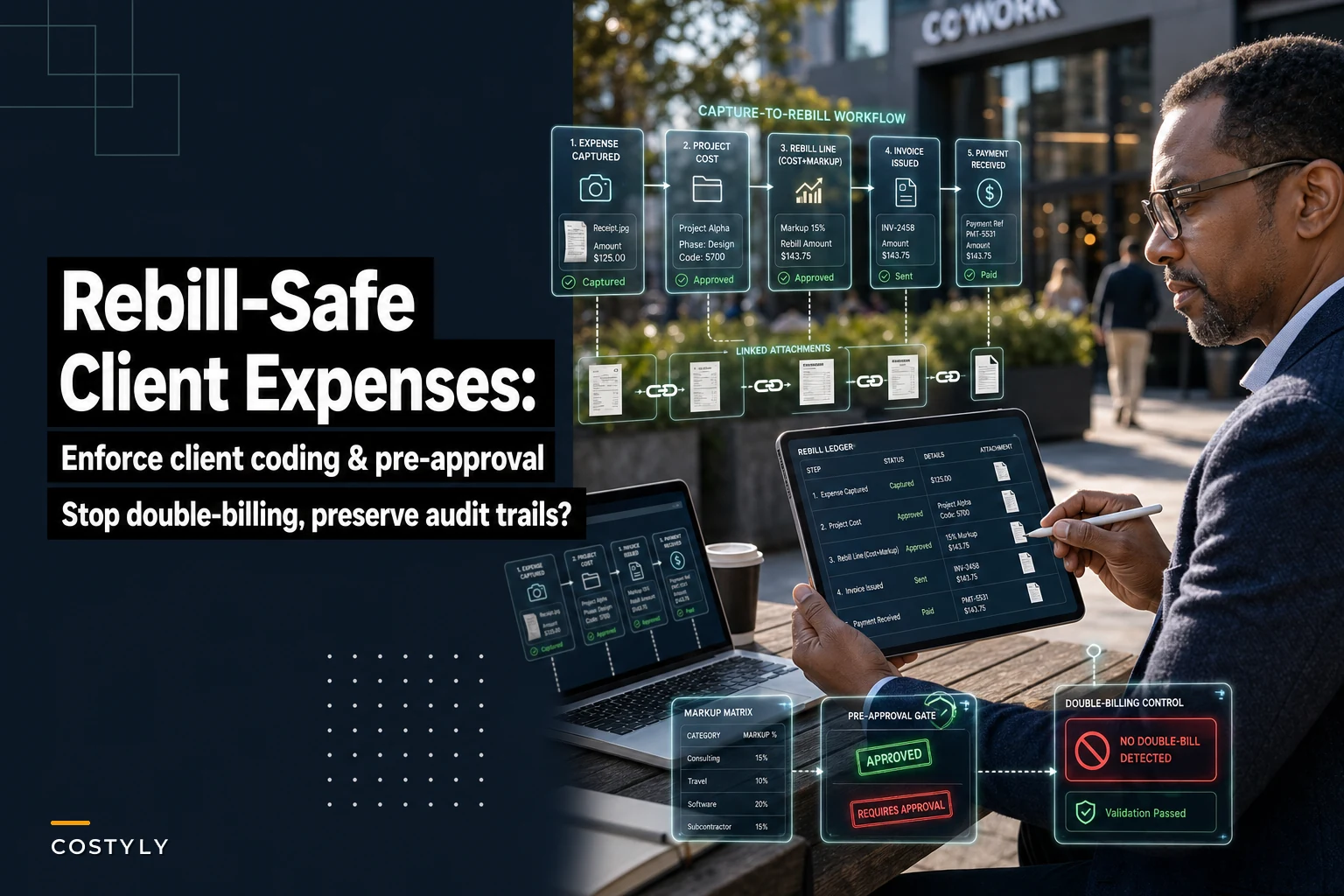
This post is about one thing: building a capture-to-rebill flow where the client, the markup, the approval, and the audit trail are locked in before the expense ever reaches an invoice. Not a general expense system — the specific chain that turns a receipt into a defensible line on a client bill.
Where rebill workflows actually break
Most teams think their problem is invoicing speed. Usually it's not. The invoice is slow because the data feeding it is unreliable, and everyone knows it, so someone spends two days at month-end re-verifying expenses that should have been verified at capture.
In practice, the breakage tends to cluster in four places:
-
Coding happens too late. The person who knows which client an expense belongs to is the person who spent the money. Ask them 20 days later and they're guessing. Guesses become disputes.
-
Markup is applied inconsistently. One PM adds 15%, another adds 20%, a third forgets entirely and rebills at cost. Same firm, same expense type, three different client-facing numbers.
-
No pre-approval gate on billable items. A $600 "client dinner" gets rebilled without anyone checking whether the contract allows entertainment pass-through. Client refuses to pay. Write-off.
-
Nothing prevents the same expense from being billed twice. An expense gets pulled into a progress invoice, then swept up again in the final invoice because the two were built from different exports.
The pattern underneath all of these is the same: decisions that should be made once, at the source get deferred to a busy person under time pressure at month-end. That's where errors breed.
Enforce client-coding at the moment of capture
The single highest-leverage change is making it impossible to submit a billable expense without saying who it's billable to.
Stop losing track of your business spending.
Costyly helps you record, monitor & control expenses—accurately and efficiently.
- Automated expense categorization
- Real-time budget tracking
- Detailed financial reports
No credit card required
That sounds obvious, but most capture forms treat client and project as optional fields — or worse, free-text fields where "Acme" and "Acme Corp" and "ACME (final)" all coexist. When the code is optional, a significant chunk of billable receipts arrive uncoded, and someone downstream has to reconstruct intent from memory.
What a tight capture step looks like:
-
The submitter picks billable vs. non-billable first — before anything else. This one toggle changes every field that follows.
-
If billable, client and project become required, validated dropdowns — not free text. They pull from live project records, so closed or on-hold projects don't appear.
-
The submitter selects an expense category tied to the contract terms (reimbursable materials, travel, subcontractor cost, etc.), which determines whether markup applies.
-
The receipt image attaches at this step, not later. No image, no submission.
The reason this works isn't discipline — it's timing. The submitter has the context in their head right now. They know it was the Riverside job because they just left the site. Capturing the code while that memory is fresh is worth more than any downstream cleanup rule you can build.
If you're still mapping which categories are eligible for rebill, that groundwork matters as much as the capture form itself. It's the same discipline behind mapping expense categories to your chart of accounts — the codes have to mean something consistent before you can enforce them.
Pre-approval gates: catch non-billable "billables" before they reach a client
Coding tells you where an expense goes. A pre-approval gate decides whether it should go there at all.
The mistake teams make is approving expenses only for reimbursement — "should we pay this person back?" — and skipping the separate question of "is this actually passable to the client under the contract?" Those are two different approvals. A $90 parking charge might be fine to reimburse the employee and completely non-billable under a fixed-fee agreement. Conflating them is how you end up with client disputes on things that seemed reasonable internally.
A workable gate has two lanes:
-
Reimbursement approval — does the company pay the employee? (Manager decision.)
-
Rebill eligibility approval — does this line qualify to appear on a client invoice? (Project owner or finance decision, checked against contract terms.)
For most expenses these can run in parallel and clear quickly. The gate only needs to slow down the edge cases: anything above a threshold, anything in a category the contract restricts, anything on a fixed-fee project where pass-through isn't allowed by default.
A pattern worth stealing: set a per-category rebill ceiling. If travel over $500 or any entertainment expense automatically routes to a rebill-eligibility check, you stop the two categories that cause the most client disputes without adding friction to the 90% of expenses that are routine.
Markup matrices instead of markup guesswork
Once an expense is coded and approved as billable, the client-facing amount should be calculated, not typed. The moment a human types the markup, you've reintroduced the inconsistency you were trying to eliminate.
A markup matrix is just a lookup: given the expense category and (optionally) the client or contract tier, what multiplier applies? Something like:
| Expense category | Default markup | Notes |
|---|---|---|
| Reimbursable materials | 15% | Standard on T&M contracts |
| Subcontractor cost | 10% | Some contracts cap this at cost |
| Travel & mileage | 0% (at cost) | Rebilled at IRS/standard rate |
| Shipping / freight | 12% | Handling recovery |
| Specialty equipment rental | 20% | Higher coordination overhead |
| Entertainment | — | Non-billable by default |
The value isn't the specific numbers — yours will differ. The value is that the same expense type produces the same client price every time, regardless of who processed it. When a client questions a markup, you point to the matrix and the contract, not to whoever happened to code the receipt that week.
One caveat: contracts override the matrix. A good setup lets a specific client or project carry an exception (subcontractor markup capped at cost, say), and that exception wins over the default. Without that override capability, someone manually adjusts the number on every invoice and you're back to guesswork.
The rebill journal: keeping cost and recovery visibly separate
This is a subtle one that causes real reconciliation pain. When you rebill an expense with markup, three things need to be true at once:
-
The original cost stays recorded against the project so margin math is honest.
-
The markup is booked as recovery/revenue, not netted silently against cost.
-
The client-facing line references both, so any invoice can be traced back to the underlying receipt.
Teams that skip this end up with rebilled revenue tangled into cost accounts, which makes project profitability impossible to read. You think a job made money because rebilled expenses inflated the top line, but the markup was invisible and the real margin was thinner than it looked.
A clean rebill journal flow, in plain terms:
-
Expense captured → posts to project cost (the actual amount paid).
-
Rebill triggered → creates a linked client-billable line at cost + matrix markup.
-
Invoice issued → the billable line moves to a "billed" state and locks.
-
Payment received → recovery closes; the original cost and the markup remain separately visible for margin reporting.
Each state having a distinct name means an expense can only be in one of them at a time. Which leads directly to the failure that costs the most.
Here's a simple visual of the rebill journal flow.
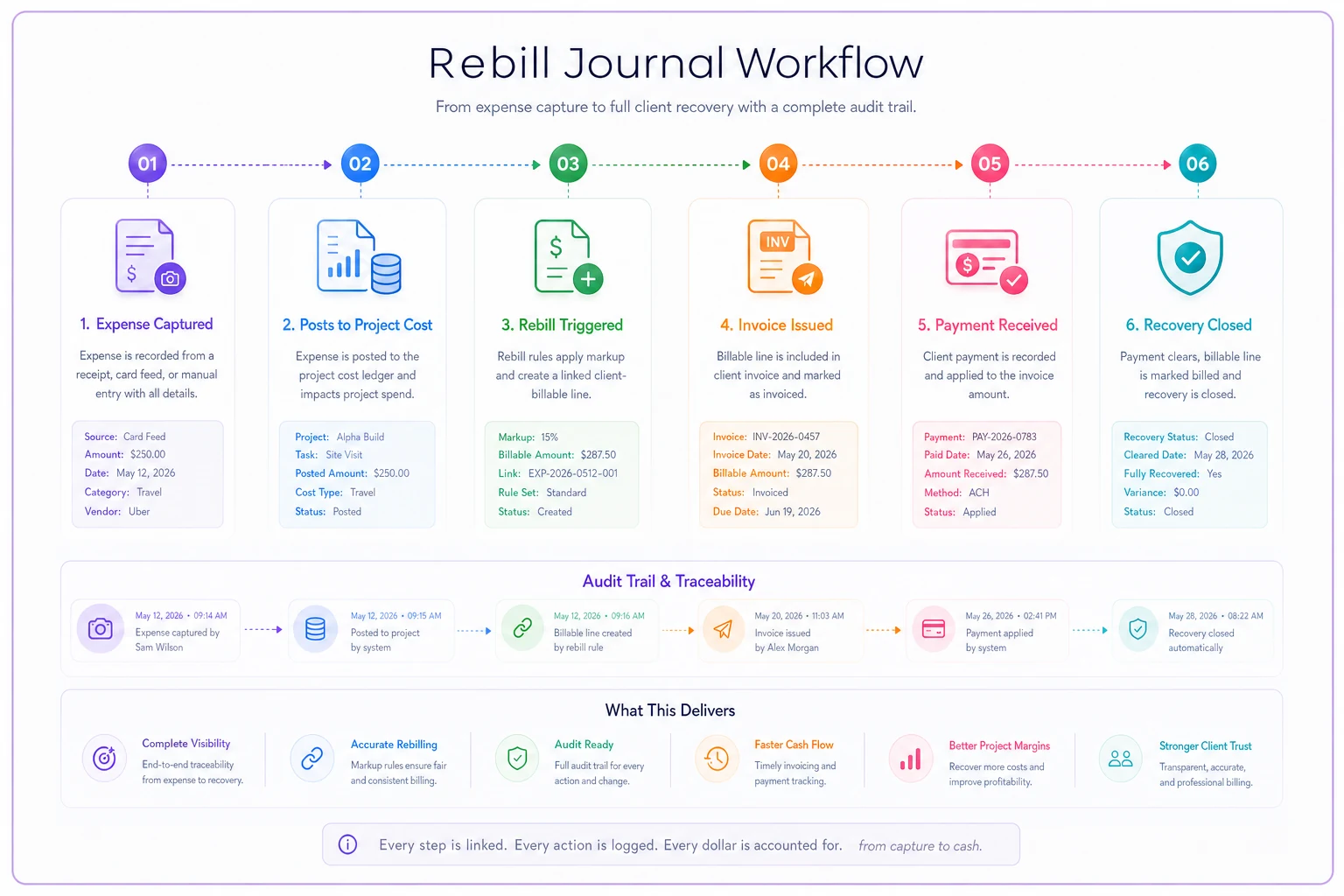
Use this flow as a checklist when designing the status and linkage rules in your system.
Preventing double-billing: the control most teams don't have
Double-billing rarely comes from dishonesty. It comes from two people building invoices off two different exports, or from a progress invoice and a final invoice both scooping up the same expense window. It's a process gap, not a character flaw.
The fix is a status lock on the expense itself. Once an expense line is attached to an issued invoice, it should be flagged billed and structurally excluded from any future invoice draft. Not "please remember not to include it" — actually removed from the pool of billable items.
Controls that stop it:
-
One-way state transitions. Billable → billed → paid. Nothing goes back to "available" without an explicit credit note that's also logged.
-
Invoice-line references. Every client line stores the specific expense IDs it contains, so you can prove exactly what was billed and when.
-
Draft validation. When a new invoice draft pulls billable items, anything already flagged billed simply doesn't appear.
-
Credit-note traceability. If you need to re-bill after a correction, it happens through a credit and re-issue, both linked to the original — never by silently reactivating the line.
A typical failure looks like this: a firm runs progress billing monthly by exporting "unbilled expenses." One month someone edits an already-invoiced expense to fix a typo, which quietly resets its status in a spreadsheet. Next export, it's back in the unbilled pool. Gets billed again. The client catches it, and now every prior invoice is under suspicion. The double-billed $240 wasn't the real cost — the eroded trust was.
Invoice-attachment audit trails that speed up billing instead of slowing it down
The instinct is to treat audit trails as overhead — something you build for auditors and disputing clients. Done right, they're actually what makes invoicing fast, because nobody has to hunt for backup.
-
the original receipt image captured at source
-
the who/when of coding (submitter, timestamp, client/project selected)
-
the approval record (reimbursement + rebill eligibility, with approver and time)
-
the markup applied and which matrix or exception produced it
-
the invoice it landed on and the date it was issued
When a client emails asking about a $340 line on invoice #1082, the answer is one click away: here's the receipt, here's the project it was coded to on the 3rd, here's the 12% freight markup from the standard schedule, approved by the PM on the 4th. Dispute closed in minutes instead of a two-day archaeology dig through email threads and shared drives.
A small design-build firm — roughly 12 people — was spending close to two full days each month assembling rebill backup: pulling receipts from texts, matching them to projects, re-deriving markups. After moving coding, approval, and markup to the capture step and attaching backup automatically to each invoice line, that dropped to a few hours of review. Client disputes on expense lines fell noticeably too, mostly because the numbers matched what clients expected and the backup was right there. The margin recovery from expenses that used to slip through uncoded and never got rebilled was worth more than the time savings alone.
This connects directly to how firms handle allocating shared expenses without spreadsheets. The underlying principle is the same — capture the allocation logic once, at the source, so downstream billing is a lookup instead of a reconstruction.
When this level of rigor makes sense — and when it doesn't
Not every business needs a full capture-to-rebill chain. Building one has a real cost, and it's worth being honest about where the payoff actually is.
This makes sense when:
-
A meaningful share of your revenue is client-billable pass-through (agencies, contractors, consultancies, professional services).
-
You run multiple concurrent projects and expenses get coded to the wrong one regularly.
-
Different people apply markup inconsistently, or you've had client disputes over rebilled amounts.
-
Progress billing and final billing overlap, creating double-bill risk.
This is overkill when:
-
Rebillable expenses are rare and small — a handful a month you can eyeball.
-
You have a single project running at a time, so miscoding isn't really possible.
-
Your contracts are pure fixed-fee with no pass-through at all.
Who should not rush this: any firm whose category definitions are still messy. If "materials" and "supplies" and "job costs" mean different things to different people, enforcing coding at capture just enforces the confusion faster. Fix the taxonomy first, then lock the capture form. Enforcing a bad structure is worse than enforcing nothing.
Putting it together
The through-line is straightforward: every decision that ends up on a client invoice — which client, whether it's billable, what markup, whether it's already been billed — should be made once, as early as possible, by the person with the most context, and then carried forward untouched.
When coding happens at capture, approval gates run before anything reaches a client, markup comes from a matrix instead of memory, and the audit trail attaches itself along the way — month-end billing stops being a reconstruction project. You're not re-deriving what happened. You're issuing what the system already knows to be true.
The rebill mistakes that hurt most aren't dramatic. They're the $180 miscode, the forgotten markup, the expense billed twice off two different exports. Fix them at the source and both the disputes and the quiet margin leaks mostly disappear on their own.
Ready to master your business expenses?
Join 5,000+ businesses using Costyly to save time, reduce overspending, and improve financial visibility.