
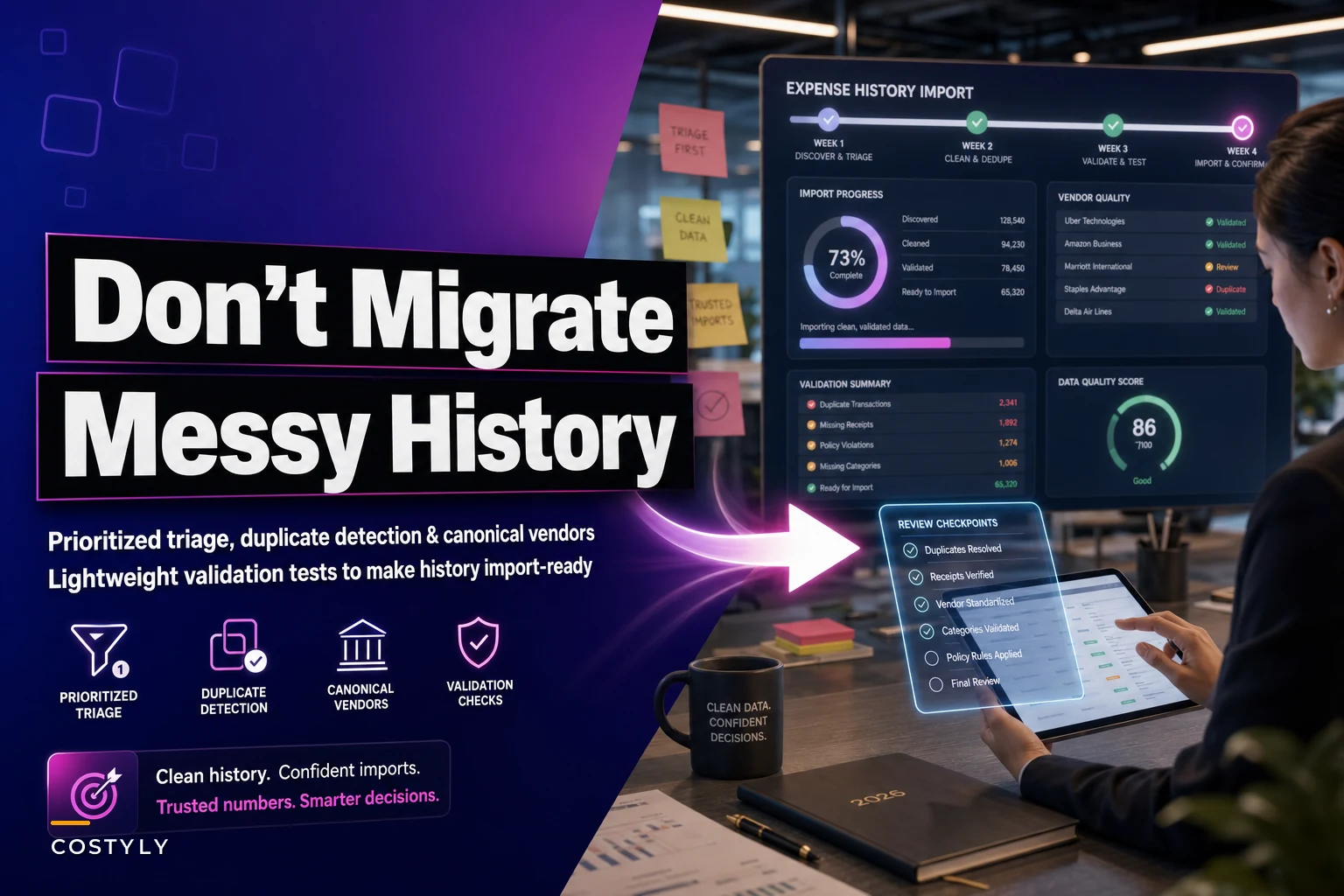

Every migration project starts the same way. Finance pulls three years of expense data from the old system, loads it into Excel, and suddenly realizes they're staring at 47,000 rows of chaos. Duplicate vendors with slightly different names. Expenses categorized as "Miscellaneous" or "Other" that could mean anything from office supplies to client entertainment. Credit card statements where half the line items say "AMZN MKTP US" with no context about what was actually purchased.
The natural instinct is to push through—just get everything into the new system and fix it later. That messy historical data contaminates your new expense management platform from day one. Your reporting breaks. Your automation rules fail. Your team spends months cleaning up problems that could have been prevented with focused cleanup before migration.
After watching dozens of small businesses struggle through expense system migrations, the successful ones follow a specific cleanup sequence. They don't try to fix everything. They identify the 20% of data problems that will cause 80% of future headaches, then systematically eliminate those issues before importing anything.
Why historical expense data degrades over time
Your expense data didn't start out messy. Three years ago, when you first implemented your current system, categories made sense. Vendor names were consistent. Approval workflows actually matched your organizational structure.
But operational reality slowly corrupted that clean foundation. New employees started entering expenses differently. That marketing contractor you hired for six months created their own categorization logic. Your bookkeeper changed how they recorded Amazon purchases halfway through 2022. The sales team discovered they could bypass approval requirements by splitting large expenses into smaller chunks.
These inconsistencies compound silently. Nobody notices when "Google Workspace" becomes "Google Inc" becomes "GOOGLE *GSUITE" across different months. The accounting team just adapts, mentally translating these variations during reconciliation. Manual workarounds become muscle memory.
Then migration day arrives, and suddenly all those mental translations need to become automated rules. Your new expense management software can't read minds. It sees "Google Workspace" and "GOOGLE *GSUITE" as completely different vendors. Your carefully designed automation breaks immediately.
The four critical cleanup targets
Not all data problems matter equally for migration. Some inconsistencies are annoying but harmless. Others will completely derail your new system's ability to automate workflows and generate accurate reports.
Stop losing track of your business spending.
Costyly helps you record, monitor & control expenses—accurately and efficiently.
- Automated expense categorization
- Real-time budget tracking
- Detailed financial reports
No credit card required
Four cleanup targets deliver the most impact for the least effort:
1. Vendor name consolidation
This is your biggest win. Most small businesses have 3-5 name variations for their top 20 vendors. These duplicates destroy your ability to track vendor spend, negotiate contracts, or set up automated approval rules.
Export all unique vendor names from your historical data. Sort by total spend to identify your top 50 vendors—these typically represent 70-80% of your total expense volume. For each vendor, search for variations using partial string matching. You'll find patterns like:
-
Amazon.com Inc / AMZN MKTP / Amazon Web Services
-
Uber Technologies / UBER *TRIP / Uber Eats
-
Microsoft Corporation / MSFT / Microsoft Azure
Create a canonical vendor list mapping all variations to a single standard name. This becomes your source of truth for the migration. Any future variation gets mapped to the canonical name automatically.
2. Near-duplicate transaction detection
Near-duplicates happen when the same expense gets entered multiple times with slight variations. Maybe someone submitted a receipt through the mobile app, then their assistant entered it manually from the credit card statement. Or a recurring charge hit twice in the same month due to a billing error, but nobody caught it during reconciliation.
These duplicates inflate your historical spending data and break budget forecasts in your new system. The challenge is distinguishing true duplicates from legitimate similar transactions.
-
Same amount (within 5% tolerance)
-
Same vendor
-
Dates within 3 days
-
Same submitter or card
Flag potential duplicates for human review rather than auto-deleting. Sometimes that second Staples charge really is legitimate—just from a different store location.
3. Category standardization
Most expense systems accumulate category sprawl over time. You started with 15 clean categories. Three years later you have 67, including gems like "Misc-Other-General" and "TBD-Needs Review."
Don't just map everything to your new category structure blindly. Some historical categorizations contain business logic you've forgotten about.
-
Direct mappings for clear matches
-
Split mappings where one old category feeds multiple new ones
-
Review queue for ambiguous items
This preserves important historical context while establishing clean categories for your new system.
4. Approval chain validation
Historical approval data often reflects outdated organizational structures. That manager who left 18 months ago still shows as an approver on hundreds of historical transactions. The temp CFO from your interim period approved expenses outside their actual authority. Team restructures created approval chains that no longer exist.
-
Identify policy violations that need review
-
Calibrate your new approval automation
-
Spot patterns that suggest your current approval matrix needs adjustment
Run validation tests against your planned approval rules. Any historical transaction that wouldn't pass current rules gets flagged for review during migration.
The triage sequence that actually works
Cleaning historical expense data feels overwhelming because most teams try to fix everything simultaneously. They bounce between vendor cleanup, category mapping, and duplicate detection without finishing any single task. Three weeks later, they're still cleaning data while the migration deadline looms.
The most efficient cleanup follows a specific sequence:
A visual workflow of the four-week triage follows.
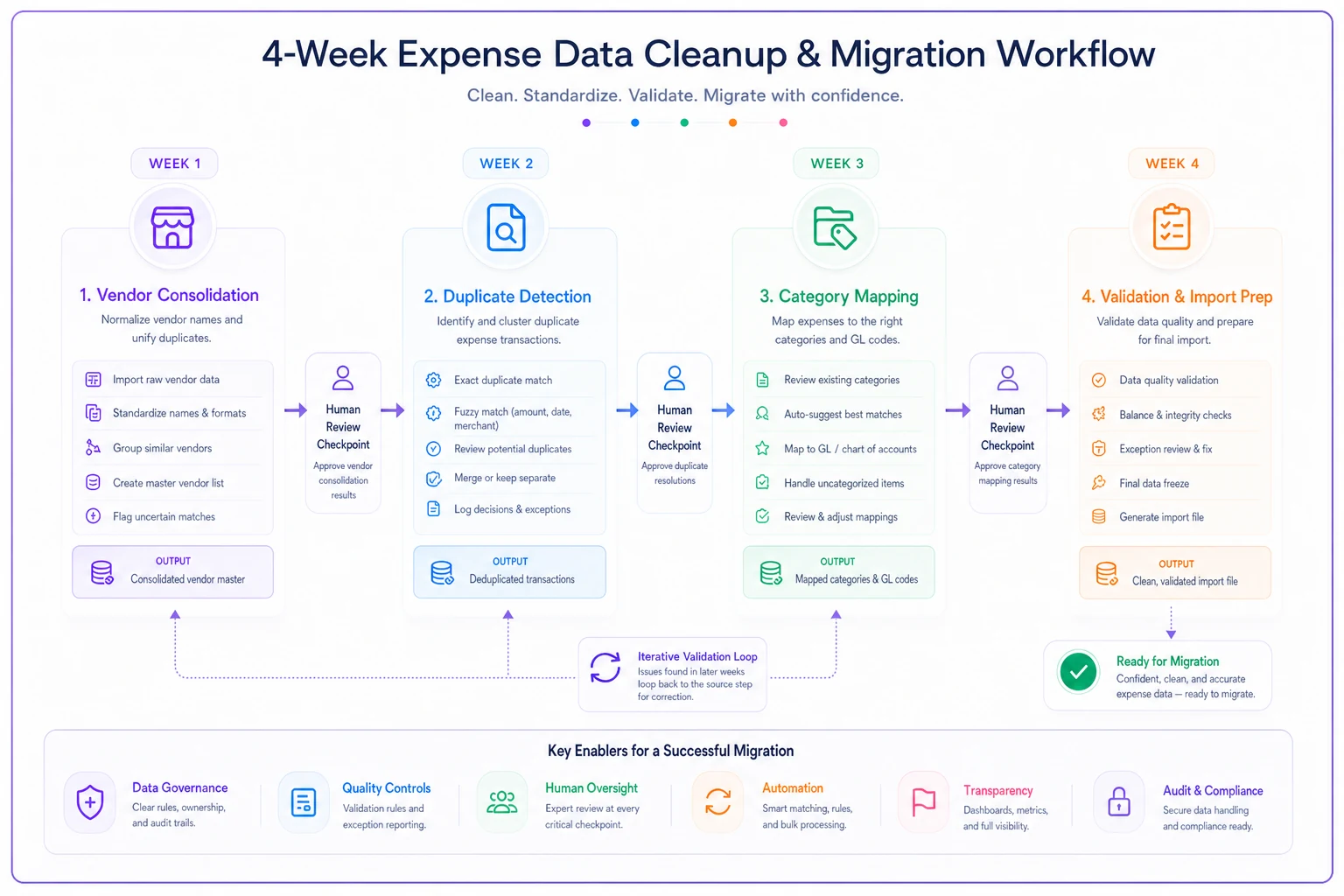
Week 1: Vendor consolidation Start here because clean vendor data makes everything else easier. Export your vendor list, identify the top 50 by spend, and create your canonical mappings. This immediately improves data quality for 70% of your transactions.
Prioritize your top 50 vendors by spend for the fastest impact.
Week 2: Duplicate detection With vendors standardized, duplicate detection becomes far more accurate. You can now catch cases where the same expense was entered under slightly different vendor names. Run your detection rules and queue suspicious transactions for review.
Week 3: Category mapping Clean vendors and removed duplicates mean your category analysis reflects actual spending patterns. Map straightforward categories automatically, flag edge cases for human review. Don't aim for perfection—85% accuracy is good enough for historical data.
Week 4: Validation and import prep Run your approval chain validation, address critical flags, and prepare your import files. This is also when you decide what not to migrate—sometimes leaving the messiest 5% of historical data behind is the smartest choice.
Building your cleanup validation framework
Before importing anything into your new system, you need confidence that your cleaned data won't break automation rules or corrupt reporting. Most teams skip this validation step and discover problems weeks later when monthly reports don't match historical trends.
Spend pattern consistency check
Compare monthly spending totals before and after cleanup. If your cleanup process dramatically changed historical spending patterns, something went wrong. Look for:
-
Months where spending dropped more than 20% (over-aggressive duplicate removal)
-
Vendor totals that changed more than 10% (incorrect consolidation)
-
Categories that grew or shrank dramatically (mapping errors)
Automation rule testing
Take a sample of 100 cleaned historical transactions and run them through your new system's automation rules:
-
Do approval workflows trigger correctly?
-
Do recurring charge detection patterns identify the right transactions?
-
Do budget categorizations match expectations?
Any rule that fails on more than 10% of historical transactions needs refinement before migration.
Cross-period reconciliation
Pick three random months from your historical data. Reconcile the cleaned versions against original bank statements and credit card records. The totals should match within 1%. Larger variances indicate systematic cleanup errors that need investigation.
The hidden cost of not cleaning: a real migration disaster
A 45-person professional services firm learned this lesson expensively. They migrated three years of expense data without cleanup, believing their new AI-powered platform could handle the inconsistencies. The migration technically succeeded—all 52,000 historical transactions imported successfully.
Then the problems started. The automated vendor payment system paid the same invoice three times because historical duplicates trained the AI to expect multiple entries for certain vendors. The spend analytics dashboard showed marketing expenses doubling year-over-year, but it was just category inconsistencies making historical spend appear lower than reality. The CFO spent two weeks explaining to the board why their new "advanced" system was producing obviously wrong reports.
Recovery took four months. They had to extract all historical data, clean it properly, and re-import everything. During those four months, they ran two expense systems in parallel because nobody trusted the new platform's reports. The cleanup they skipped to save two weeks of effort cost them sixteen weeks of chaos.
When to abandon historical data entirely
Sometimes the smartest migration strategy is selective abandonment. Not all historical data deserves preservation, especially when the cleanup effort exceeds the value of maintaining that history.
The source system is fundamentally broken
If your old system allowed free-text entry for all fields, enforced no validation rules, or lost data integrity through years of patches and workarounds, cleaning might be impossible. One client discovered their previous system had been randomly duplicating transactions for two years. We archived the raw data for compliance and started fresh.
Regulatory requirements are minimal
If you only need to maintain records for audit purposes, keep the old system in read-only mode rather than migrating garbage data. You can always reference it when needed without contaminating your new operational system.
The business model has completely changed
A company that pivoted from retail to SaaS doesn't need three years of inventory purchase history cluttering their expense system. Keep the old data archived but don't migrate categories and workflows that no longer apply to your current operations.
The volume exceeds your cleanup capacity
If cleanup would take your finance team two months of full-time work, that's two months they're not managing current operations. Sometimes importing just the most recent 12 months of clean data makes more sense than heroic cleanup efforts.
Your cleanup decision matrix
For each data segment in your historical expenses, make an explicit decision:
| Data Segment | Volume | Cleanup Effort | Business Value | Decision |
|---|---|---|---|---|
| Top 20 vendors (2 years) | 8,000 records | 2 days | Critical for negotiations | Full cleanup & migrate |
| All vendors (3+ years old) | 15,000 records | 2 weeks | Low - vendors changed | Archive only |
| Corporate card (1 year) | 3,000 records | 3 days | High - active expenses | Full cleanup & migrate |
| Employee reimbursements (old format) | 5,000 records | 1 week | Medium - some disputes | Selective migration |
| Miscellaneous category | 12,000 records | 3 weeks | Very low | Abandon |
This matrix forces explicit tradeoffs. You're acknowledging that perfect historical data isn't the goal—functional operational data is.
The AI advantage in migration cleanup
Modern AI-powered expense platforms can dramatically accelerate cleanup, but only if you provide clean training data. This creates an important sequencing decision: should you use AI to help clean historical data, or clean first then let AI learn from that clean data?
The answer depends on your data quality baseline. If your vendor names are roughly 70% consistent, AI can identify and suggest consolidation patterns. It can recognize that "AMZN MKTP US*2Y7KL9QX3" and "Amazon.com" are the same vendor. But if your data is chaotic—free text, no standards, multiple languages—AI will learn the chaos and perpetuate it.
The sweet spot is hybrid cleanup. Use AI to identify patterns and suggest standardization rules, but have humans validate those rules before applying them. Let AI flag potential duplicates based on fuzzy matching, but require human confirmation before deletion. This approach typically reduces cleanup time by 60% while maintaining accuracy.
Once your historical data is clean and migrated, AI becomes incredibly powerful. It learns your vendor patterns, understands your categorization logic, and can automatically handle variations that slip through. But that learning requires a clean foundation.
Building your go-forward data quality system
The real value of historical cleanup isn't just cleaner old data—it's the patterns you discover about how data quality degrades. Every inconsistency in your historical data reveals a weakness in your current processes.
Vendor name standardization rules
Implement automated vendor matching with manual override options. When someone enters a new vendor similar to an existing one, the system suggests consolidation. This prevents the slow accumulation of duplicates.
Required fields and validation
Every migration reveals fields that should have been mandatory but weren't. Make receipt attachments required for expenses over $100. Force selection from dropdown menus instead of allowing free text. These small frictions prevent big cleanup projects later.
Monthly quality audits
Schedule systematic reviews of new data quality metrics:
-
New vendor variations created
-
Transactions in generic categories
-
Expenses missing receipts
-
Unusual approval patterns
Catching quality issues monthly prevents the multi-year accumulation that makes migrations so painful.
Team training on data impact
Most employees don't realize how their individual data entry choices impact financial reporting and automation. Show them specific examples: "When you enter Amazon as 'AMZN', the system can't automatically categorize it as an IT expense, which breaks our budget tracking." This context transforms compliance from bureaucracy to operational necessity.
The cleanup investment that pays for itself
Historical data cleanup feels like pure overhead—weeks of effort just to start where you should have been already. But clean migration data delivers immediate returns through your new system's automation capabilities.
Clean vendor data enables automated three-way matching between purchase orders, receipts, and invoices. Clean categories allow AI to accurately predict and auto-categorize new expenses. Clean approval histories let you design workflows that actually match your business reality.
One marketing agency spent three weeks cleaning two years of historical expenses before migrating to an AI-powered platform. Post-migration, their monthly close shortened from five days to one day. Expense report processing dropped from 3 hours weekly to 20 minutes. The cleanup effort paid for itself in the first quarter through time savings alone.
More importantly, their new system's AI learned from clean data. Six months post-migration, the platform accurately auto-categorizes 94% of new expenses and flags genuine anomalies instead of false positives from dirty data. That level of automation would have been impossible with messy historical data contaminating the training process.
Start your cleanup sprint today
Clean historical expense data migration isn't about perfection—it's about pragmatic preparation. Focus on the four critical areas: vendor consolidation, duplicate detection, category standardization, and approval validation. Follow the triage sequence. Build validation frameworks. Make explicit decisions about what to migrate, clean, or abandon.
The difference between successful and failed migrations isn't the sophistication of your new expense management platform. It's the quality of data you feed into that platform on day one. Every hour invested in cleanup before migration saves days of firefighting after go-live.
Your messy expense history doesn't have to contaminate your operational future. But that requires making cleanup a priority before migration, not an afterthought when automation fails. The recipe is clear—vendor consolidation, duplicate detection, category mapping, validation testing. The only question is whether you'll follow it or join the ranks of companies discovering these lessons through painful post-migration recovery.
Ready to master your business expenses?
Join 5,000+ businesses using Costyly to save time, reduce overspending, and improve financial visibility.