

Most small finance teams treat expense security as something they'll get to later — usually right before an audit, a funding round, or the uncomfortable moment when someone realizes the shared Google Drive folder with three years of receipts is accessible to the whole company. Receipts have full card numbers on them. Reimbursement records have home addresses. Expense exports have employee names tied to medical copays, therapy invoices, and the occasional divorce-attorney charge that got mis-submitted.
None of that is hypothetical. It's just what accumulates when expense data grows faster than the rules around it.
This part of expense operations is nobody's favorite because it doesn't move a number on the P&L. But when it breaks, it breaks expensively — regulatory exposure, a leaked employee's PII, or an auditor asking for records you deleted (or kept too long, which is somehow worse). The goal here isn't to turn your five-person finance team into a security department. It's to build a framework that's proportional to your size, holds up under scrutiny, and doesn't require a dedicated person to maintain.
The core problem: expense data is unusually messy from a privacy standpoint
Most operational data is boring and structured. Expense data is neither. A single expense line can carry:
-
A card number (PCI-relevant)
-
An employee name and home address (reimbursement PII)
-
A vendor that reveals something sensitive (a pharmacy, a legal firm, a medical clinic)
-
Attachments that contain basically anything — a receipt photo might include a second card, a signature, a license plate, or someone else's information in the background
That's why you can't throw a blanket "encrypt everything" policy at it and call it secure. Different record types carry different risk, need different access rules, and should sit on different retention clocks. Treating a mileage log the same as a medical reimbursement is how teams end up either over-restricting (finance can't do their job) or under-restricting (an intern can see the CEO's card statements).
The pattern that shows up repeatedly in smaller companies: security is applied at the tool level ("only finance has a Concur login") but never at the record level. So the moment finance exports anything to a spreadsheet — which happens constantly — the controls disappear. The framework has to survive the export, not just the login screen.
Role-based access: design for the export, not just the app
The biggest mistake in SMB expense access is thinking about who has an account instead of who can see what, and what happens when they pull it out of the system.
Stop losing track of your business spending.
Costyly helps you record, monitor & control expenses—accurately and efficiently.
- Automated expense categorization
- Real-time budget tracking
- Detailed financial reports
No credit card required
Here's a practical role model that works for teams from about 5 to 50 people. Keep it to a handful of roles — the more you invent, the less anyone actually maintains them.
| Role | Can see | Cannot see | Export rights |
|---|---|---|---|
| Submitter (employee) | Their own expenses + attachments | Anyone else's records | Own records only |
| Approving manager | Their team's expenses, redacted card numbers | Full PANs, other teams | Summary export, no PII |
| Finance operator | All expenses, masked card data | Full card numbers unless needed for dispute | Full export, logged |
| Finance admin | Everything + settings + access logs | — | Full export, logged + alerted |
| External auditor (temp) | Scoped read-only, time-boxed | Live edit, settings, unrelated periods | Pre-approved export formats only |
Two rules make or break this:
-
Masking is the default, unmasking is the exception. Card numbers should show as
* * 4821everywhere except a specific "reveal" action that's logged with a reason. Most people never actually need the full PAN — they need the last four digits to match a transaction. -
Every export is a logged event. If your finance operator downloads a full CSV of Q3 reimbursements, that should be recorded: who, when, how many records, what fields. Not because you distrust them — because when something leaks, "who touched this data" is the first question you'll be asked, and "we have no idea" is not an acceptable answer.
Require a ticket ID and reason when unmasking so you can quickly link reveals to approvals during audits.
One pattern worth borrowing: give managers aggregate visibility, not row-level. A department head usually needs to see that their team spent around $14k on travel last month, not that Marcus expensed a $180 pharmacy charge. Row-level visibility for managers is where most accidental internal PII exposure comes from.
If you're already tightening up who owns what in your expense process, this layers directly on top of that work. Access without governance just means the wrong people are locked out of the wrong things — the ownership framework in expense governance that scales for 5–20 person teams is a natural starting point before you layer on access controls.
PII redaction rules: what to strip, and when
Redaction is where teams either overthink it or ignore it entirely. The useful middle is a set of rules tied to what the record is actually for.
The principle: redact at the point where data leaves its original purpose. A receipt image is fine sitting in the system attached to its expense. The moment that receipt gets exported, shared with a manager, or bundled into an audit package, it should pass through redaction.
-
Card numbers Store masked. Never export full PANs into spreadsheets. If a dispute needs the full number, it comes from the card provider's portal, not your expense archive.
-
Home addresses Needed for reimbursement checks, not for anything else. Strip from any export that goes to a manager or auditor unless address verification is the specific purpose.
-
Attachment scrubbing Receipt images are the sneakiest leak. A hotel folio can show a full card number, a signature, and a room number. For anything shared outside finance, either redact the image or replace it with parsed transaction data (merchant, amount, date, tax) instead of the raw photo.
-
Sensitive-vendor flagging Charges from pharmacies, clinics, legal offices, or counseling services should be flagged so they're never surfaced in team-level reports. You don't need to know why someone was at a clinic — you need to confirm it's a legitimate business expense and move on.
A common scenario: a 30-person company runs a quarterly expense report for department heads. Nobody thinks much about it, so the export includes raw merchant names. One line shows a recurring charge to a fertility clinic. Now three managers know something deeply private about an employee who never consented to share it. That's not a hacker — that's a default export setting nobody bothered to configure.
Redaction rules prevent the boring, internal, entirely-your-fault leaks. Those are far more common than external breaches at this size.
Retention and archival: different clocks for different records
"Keep everything forever" and "delete it to save space" both cause real problems. Keeping everything means more surface area to breach and more to hand over in a discovery request. Deleting too aggressively means you can't answer an auditor or defend a deduction.
The answer is per-record-type retention, not a single company-wide number. Here's a starting schedule most SMBs can adapt (check your local tax and employment rules — these are operational defaults, not legal advice):
| Record type | Active retention | Archive | Then |
|---|---|---|---|
| Tax-relevant receipts & expense records | Current + 3 years live | Years 4–7 cold storage | Purge after 7 |
| Reimbursement records (with PII) | Current + 3 years | Years 4–7, PII redacted | Purge PII at 7, keep amounts |
| Card statements | Current + 2 years | Years 3–7 cold | Purge after 7 |
| Approval logs & audit trails | Match longest related record | Same | Purge with parent |
| Disputed/investigated items | Hold until resolved + 7 years | — | Extended hold if litigation |
| Attachments (raw images) | 3 years | Redacted after 3 | Delete raw at 3 |
The key insight: retention and redaction should work together over time. A reimbursement record doesn't need to keep an employee's home address for seven years — it needs the amount and category for seven years, and the PII can be stripped after year three. Most teams treat a record as all-or-nothing. The smarter move is aging out the sensitive fields while keeping the financially relevant ones intact.
Worth flagging: if your historical expense data is already a mess, don't build retention rules on top of a broken foundation. Clean first, schedule second. The prioritized approach in don't migrate messy expense history is the right order of operations — retention schedules only work when you can actually tell what each record is.
Auditor-ready exports: build the format before you need it
The worst time to design an export format is the week an auditor asks for one. You end up hand-assembling CSVs, manually redacting fields, and inevitably leaving a full card number sitting in column G.
Build two standard export shapes ahead of time: a CSV for structured review and a JSON for systems that need to ingest it. Both should be redacted by default.
A clean auditor CSV looks roughly like this: expenseid,date,employeeref,department,category,merchant,amount,currency,tax,cardlast4,approvalstatus,approvedby,glcode EXP-10241,2024-03-11,EMP-0087,Sales,Travel-Air,Delta,412.60,USD,0.00,4821,APPROVED,MGR-0012,6100 EXP-10242,2024-03-11,EMP-0087,Sales,Meals,Local Bistro,84.20,USD,6.83,4821,APPROVED,MGR-0012,6220 EXP-10243,2024-03-12,EMP-0104,Ops,Software,Adobe,52.99,USD,0.00,3390,APPROVED,MGR-0031,6400
Notice what's not there: no full card number, no home address, no employee name — just an employee_ref that maps to a name in a separate, access-controlled lookup only finance can join. Auditors almost never need names; they need traceable, consistent identifiers.
The JSON version for a per-record deep dive: { "expenseid": "EXP-10241", "date": "2024-03-11", "employeeref": "EMP-0087", "department": "Sales", "category": "Travel-Air", "merchant": "Delta", "amount": 412.60, "currency": "USD", "tax": 0.00, "cardlast4": "4821", "approval": { "status": "APPROVED", "approvedby": "MGR-0012", "approvedat": "2024-03-12T09:14:00Z" }, "attachments": [ { "type": "receipt", "redacted": true, "storedref": "att-88213" } ], "gl_code": "6100" }
The redacted: true flag matters more than it looks. It tells the auditor — and future-you — that the attachment was scrubbed before export, which is exactly the kind of detail that makes an audit go smoothly instead of turning into a two-week PII cleanup project.
All of this depends on clean categories and tags in the first place. If your category and gl_code fields are reliable, exports are a button press. If they're not, every export becomes a manual reconciliation. The naming discipline covered in tag governance for expense systems is what actually makes auditor-ready exports repeatable.
A lightweight incident-response runbook
You don't need a 40-page security policy. You need a one-page runbook that a stressed finance person can follow when something goes wrong — because during an incident, nobody thinks clearly.
A runbook sized for a small finance team:
-
Contain. Freeze the affected access immediately. If an export leaked, revoke the share link and the credentials involved. Don't investigate first — stop the bleeding first.
-
Scope. Pull the access logs. What records, how many, which fields, who touched them, over what window. This step takes minutes if you have logs and days if you don't.
-
Classify. What kind of data was exposed? Card numbers, PII, sensitive vendors? The classification determines your obligations. A leaked mileage log and a leaked list of medical reimbursements are very different problems.
-
Notify. Follow your obligations — internal leadership always, affected employees or customers if PII was involved, regulators or card networks if required. Have the contact list written down before the incident, not during it.
-
Remediate. Fix the setting or gap that caused it. Most incidents at this size trace back to a permission left too open or an export that skipped redaction.
-
Record. Write a short post-incident note
what happened, what you did, what changed. Auditors and insurers will ask, and "we handled it but don't remember the details" is a bad answer.
A quick checklist to keep the runbook usable:
-
[ ] One named owner for incident response (with a backup)
-
[ ] Access logs turned on and actually reviewed monthly
-
[ ] Contact list for legal, insurance, and card networks kept current
-
[ ] Redaction verified on all standard exports quarterly
-
[ ] A test run once a year — walk the runbook with a fake incident
Here's a quick visual of the runbook steps.
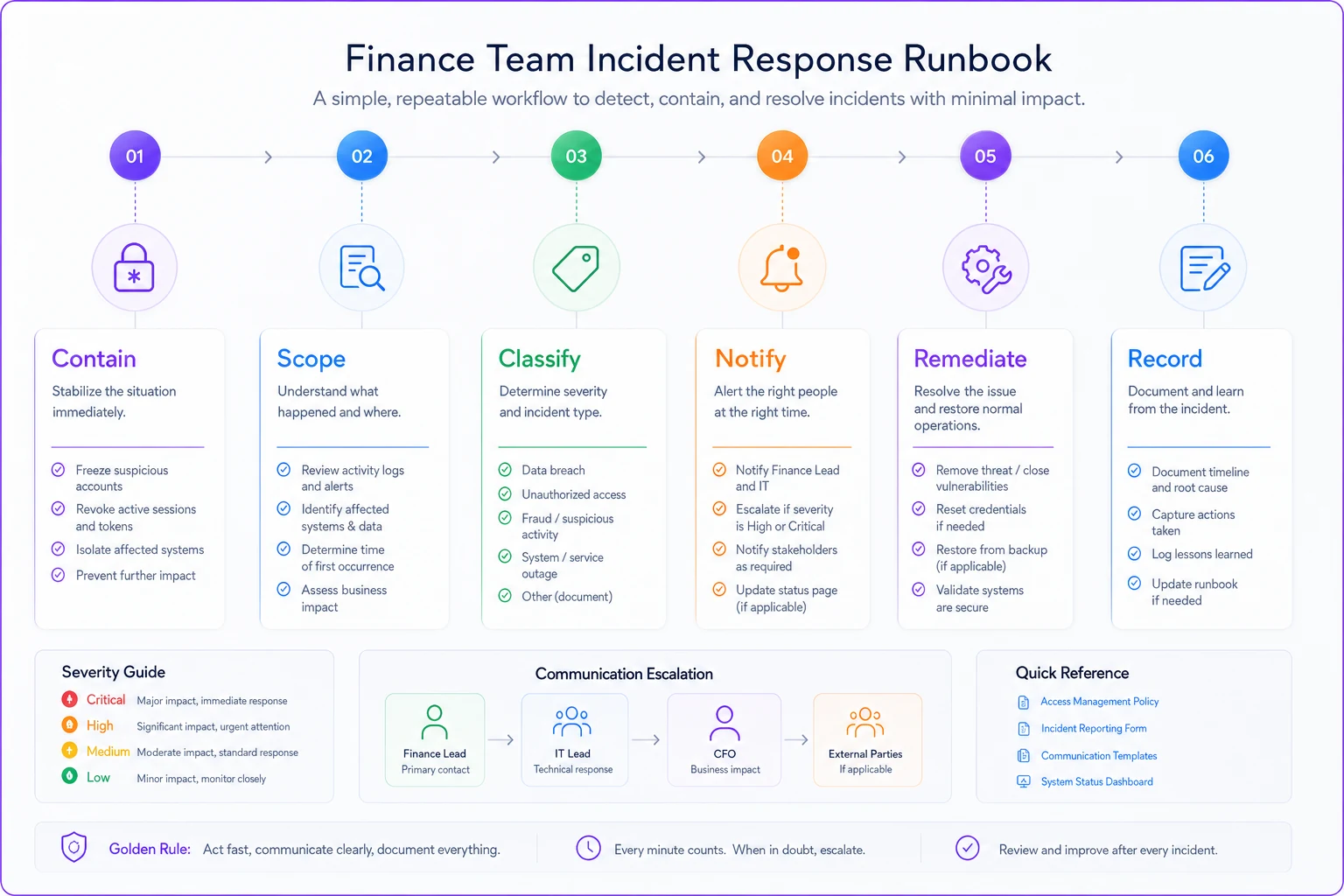
The teams that recover well from incidents aren't the ones with the best security infrastructure. They're the ones who walked through the runbook at least once, so nobody's improvising at 6pm on a Friday.
A real scenario
A roughly 25-person marketing agency ran expenses through a shared spreadsheet and a folder of receipt images. Access was "everyone in finance plus whoever needed something," which in practice meant about eight people, including a rotating pool of contractors. Retention was "we never delete anything," so they had around four years of receipts with full card numbers visible in image form.
When they went through a client's vendor-security review — a requirement to keep a large account — they failed on three points: no access logging, no PII redaction on exports, and no retention schedule. The client gave them 60 days to fix it or lose the contract, which was worth somewhere in the low six figures annually.
They didn't buy an enterprise security suite. They defined five roles, masked card numbers by default, set up the retention table above, built one standard redacted CSV export, and wrote the one-page runbook. The heaviest lift was scrubbing the historical receipt images — that took a few weeks. Within the 60-day window they passed the re-review and kept the account. As a side effect, the number of people with full data access dropped from eight to three. Nobody's day-to-day job got harder; the wrong people just stopped seeing things they never needed to see.
When this framework makes sense — and when it's overkill
Build the full framework when: you handle customer or client data under contract, you're going through any kind of security review, you're approaching a funding round or acquisition, or your headcount has grown past the point where "everyone knows everyone" stopped being a reasonable security model.
-
you handle customer or client data under contract
-
you're going through any kind of security review
-
you're approaching a funding round or acquisition
-
your headcount has grown past the point where "everyone knows everyone" stopped being a reasonable security model
Scale it down when: you're a team of three or four, all expenses run through one person, and there's genuinely no sensitive PII beyond the basics. In that case, masked card numbers, a simple retention rule, and knowing where your data lives is enough. Don't invent five roles for four people.
-
you're a team of three or four
-
all expenses run through one person
-
there's genuinely no sensitive PII beyond the basics
Who should not over-engineer this: early-stage teams still sorting out their categories and chart of accounts. If your expense data is chaotic, redaction rules and retention schedules are polish on an unfinished surface. Get the foundation stable first, then add the security layer. A retention schedule for records you can't reliably classify just automates confusion.
The point of an expense data retention framework for a small business isn't to look enterprise-grade. It's proportionality — enough control that a leak is contained and an audit is boring, without so much overhead that finance spends more time on compliance than on actual finance work. Start with role-based access and default masking, add the retention table, standardize one redacted export, and keep the runbook to a single page. That's a framework a small team can actually run, and it's the version that holds up when someone finally asks to see it.
Ready to master your business expenses?
Join 5,000+ businesses using Costyly to save time, reduce overspending, and improve financial visibility.