
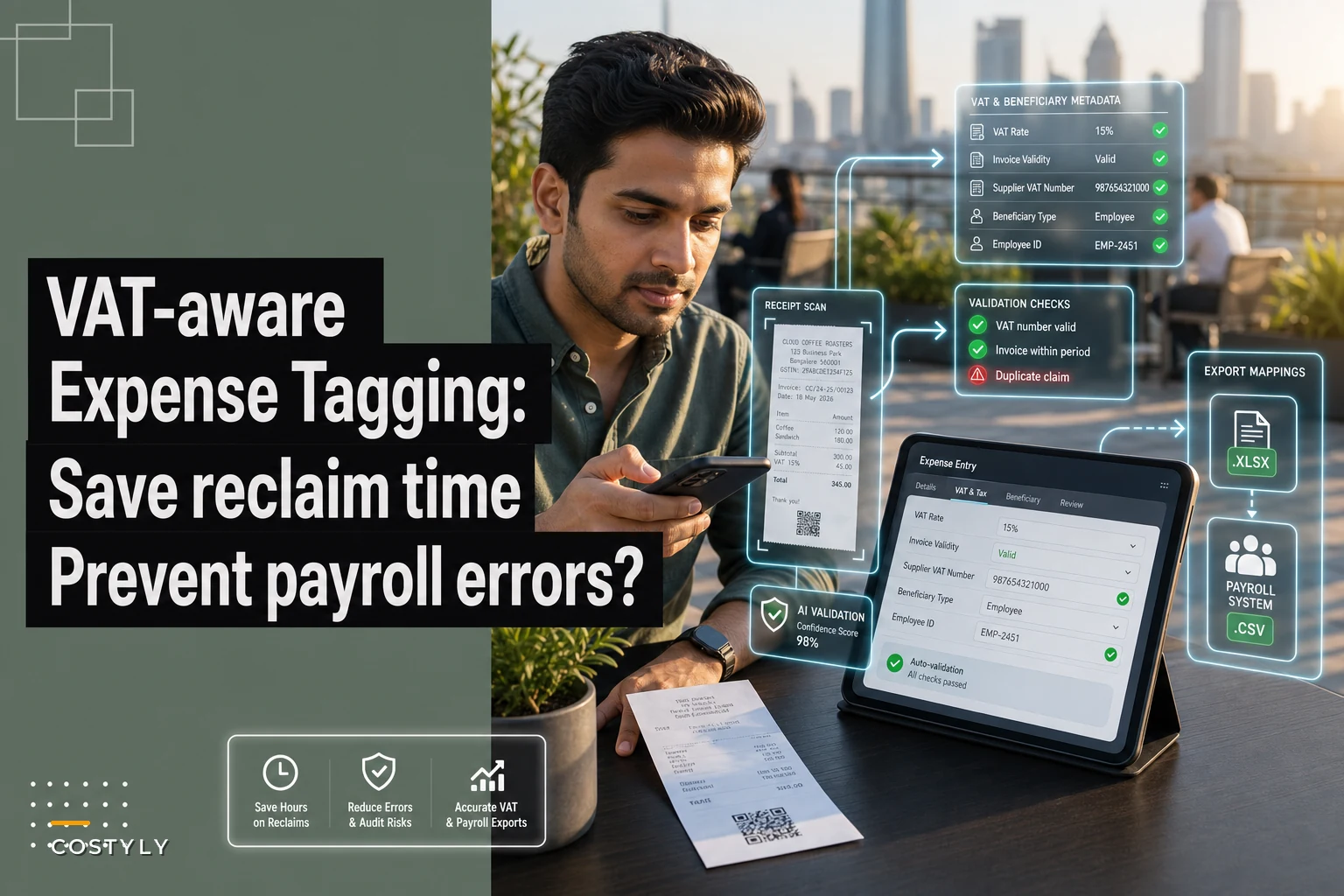

Most VAT reclaim problems don't start at reclaim time. They start the moment someone snaps a photo of a receipt and picks whatever category is closest to what they bought. Six weeks later, your bookkeeper is squinting at a blurry image trying to figure out whether that £84 hotel bill included breakfast — partially reclaimable, sometimes a taxable benefit — or was a straight room charge. Multiply that by 300 expenses a quarter and you've got a reclaim that's either understated, overstated, or held together with guesswork.
The data you need for a clean VAT reclaim and correct taxable-benefit treatment has to exist at the point of capture. You cannot reliably reconstruct it later. This post covers exactly which fields need to be tagged at source, how those tags map into payroll and tax reports, and the validation checks that stop errors from becoming HMRC adjustments.
Why reconstruction after the fact almost never works
A team runs fine on loose tagging for a year — categories like "Travel," "Meals," "Software" — because month-end reporting only needs totals. Then VAT quarter rolls around, or the accountant starts prepping P11Ds, and suddenly those loose tags are useless.
-
Whether the supplier was VAT-registered and what rate applied
-
Whether a valid VAT invoice exists (not just a receipt)
-
Who the expense benefited — the business, a specific employee, a client
-
Whether entertainment was for staff or clients (staff entertaining has a £150/head exemption; client entertaining is generally non-reclaimable)
-
Whether a mixed cost needs splitting (accommodation vs meals, business vs personal mileage)
A category tells you "this was a meal." It doesn't tell you it was a client lunch in Manchester where the VAT is blocked, versus a team dinner that falls inside the annual event exemption. Those two land in completely different places on your VAT return and payroll records — but they look identical if all you captured was "Meals — £96."
Once the person who spent the money has moved on, the context evaporates. Reconstruction becomes an email thread, a Slack message, and eventually an educated guess. That guess is what HMRC adjusts.
The fields you actually need at source
Think of tagging in two layers. The first is the accounting category, which most teams already handle — and if that structure isn't sorted yet, it's worth reading how to map expense categories to your chart of accounts before layering VAT logic on top. The second layer is the compliance metadata that drives VAT reclaim and benefit treatment.
Stop losing track of your business spending.
Costyly helps you record, monitor & control expenses—accurately and efficiently.
- Automated expense categorization
- Real-time budget tracking
- Detailed financial reports
No credit card required
Here's the minimum viable field set for that second layer:
| Field | Why it matters | Example value |
|---|---|---|
| VAT rate applied | Determines reclaimable input tax | Standard 20% / Zero / Exempt / N/A |
| Valid VAT invoice held | No valid invoice = no reclaim, regardless of rate | Yes / No / Simplified receipt |
| Supplier VAT number | Needed for reclaim above simplified-receipt thresholds | GB123456789 |
| Beneficiary type | Drives benefit-in-kind treatment | Business / Employee / Client / Mixed |
| Expense purpose flag | Separates blocked from reclaimable categories | Staff entertaining / Client entertaining / Travel / Subsistence |
| Split indicator | Flags costs needing apportionment | Single / Requires split |
| Employee attribution | Links taxable benefits to the right person for payroll | Employee ID |
The two fields people forget most often are "valid VAT invoice held" and beneficiary type. The first quietly kills more reclaims than anything else — you can have a 20% VAT charge right there on the receipt, but if what you're holding is a card slip rather than a proper VAT invoice, you can't reclaim it. The second is what feeds your P11D. Get beneficiary type wrong and you either under-report a taxable benefit (HMRC penalty risk) or over-report one (annoyed employee paying tax they don't owe).
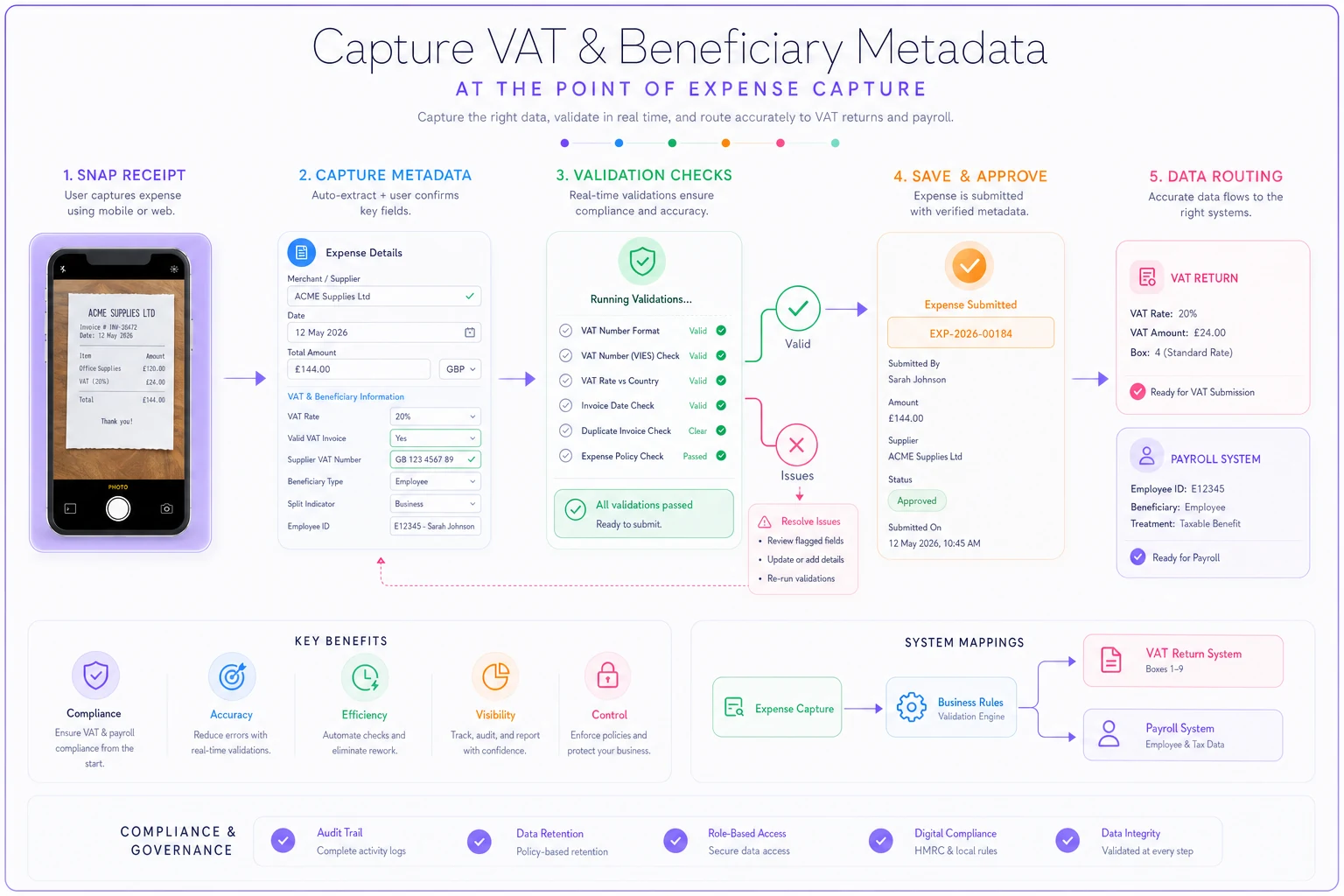
Illustration of the tagging and validation workflow.
How the tags map into payroll and tax reports
When source fields are captured properly, the mapping to downstream reports becomes almost mechanical.
Mapping to the VAT return:
-
Filter for
Valid VAT invoice held = Yes(or valid simplified receipt under the threshold). -
Exclude anything flagged
Client entertaining— input VAT here is blocked. -
Group by
VAT rate appliedand sum the VAT amounts to get reclaimable input tax by rate. -
For rows flagged
Requires split, pull only the business-and-reclaimable portion. -
The remaining total flows straight into Box 4.
Mapping to payroll / P11D:
-
Anything tagged
Beneficiary type = Employeeand not covered by an exemption becomes a candidate taxable benefit. -
These rows get grouped by
Employee ID, giving you a per-person benefit total. -
Staff entertainingrows are tested against the £150/head annual event exemption — if the running total per head stays under, no benefit arises; if it breaches, the whole amount for that person becomes taxable, not just the excess. People get this backwards all the time. -
The per-employee totals map to the relevant P11D sections.
None of these steps require judgment at report time if the judgment was captured at capture time. That's the whole game — moving the hard thinking to the moment when the person actually has context, right after they spent the money.
A real scenario
A design agency, around 14 people, London-based, was running loose categories and reclaiming VAT quarterly. Their bookkeeper spent roughly two days each quarter chasing missing invoices and re-classifying entertainment. Two recurring problems kept showing up: somewhere between £1,100–£1,400 per quarter of VAT was going unclaimed because card receipts had been logged with no proper VAT invoice attached, and staff and client entertaining were lumped in one bucket, meaning client lunches were being wrongly reclaimed.
They added three required fields at source — VAT invoice held (yes/no), beneficiary type, and entertaining subtype — and made them mandatory before submission. Nothing fancy, just enforced at the point of entry.
Over the next two quarters, the unclaimed VAT dropped to near zero because submitters were prompted to attach a proper invoice or flag that they couldn't, which turned into a same-week fix instead of a quarter-end mystery. The wrongly reclaimed client entertaining — roughly £600–£800 per quarter that would eventually have triggered an adjustment — stopped appearing on the return entirely. Bookkeeper cleanup time dropped from about two days to a few hours. Nobody's revenue changed; the money was always theirs. They just stopped leaving it on the table.
Validation checks that stop downstream adjustments
Required fields alone aren't enough, because people will pick something just to get past the form. The value comes from validation rules that catch nonsense before it's submitted.
-
Rate vs invoice consistency if
VAT rate = Standard 20%butValid VAT invoice = No, block or flag — you're claiming a rate you can't support. -
Entertaining logic gate if
Purpose = Client entertaining, force VAT reclaimable to zero automatically. -
Beneficiary vs category cross-check a
Softwarecategory taggedBeneficiary = Employeeshould prompt a question — is this a personal subscription that's actually a benefit? -
Split completeness any row flagged
Requires splitcannot be posted until both portions are entered and sum to the total. -
Employee attribution required for benefits if
Beneficiary = Employee, anEmployee IDmust be present, or the benefit can't be routed to payroll. -
Threshold watcher on staff events running total per head on staff entertaining flags when you're approaching £150 so nothing tips over silently.
Make the VAT-invoice check mandatory to avoid end‑of‑quarter chasing.
The mistake most teams make is treating validation as a month-end reconciliation task. By then the person who could answer the question has forgotten the details. Validation at submission — while the receipt and the memory are both fresh — is worth far more than the same check running three weeks later.
When strict source tagging actually makes sense
This level of rigor adds friction to every submission. It's worth it when:
-
You reclaim meaningful VAT and errors compound (£50k+ in annual expenses)
-
You have taxable benefits in play — company events, employee perks, mixed-use spend
-
You've already had an adjustment or a nervous conversation with your accountant
When it's overkill: if you're a sole trader on the flat-rate scheme with almost no reclaim and no employee benefits, most of these fields are noise. Don't build compliance machinery for a problem you don't have.
Who should hold off: teams whose base categories are still a mess. Layering VAT metadata on top of chaotic categories just gives you chaos with more fields. Fix the taxonomy first — this is exactly why getting your spend categories designed to answer real questions matters before bolting on tax logic.
Where automation quietly helps
Most of this can run in a spreadsheet if you're disciplined, but discipline is the failure point. People forget fields, skip validations, and post before splitting.
Operational software with some AI assistance can quietly close that gap — reading a receipt image and pre-filling the VAT rate and supplier number, flagging when an attachment looks like a card slip rather than a proper VAT invoice, nudging the submitter to pick a beneficiary type before the form will save. The goal isn't to replace judgment. It's to make sure the required fields are never silently skipped, so the mechanical mapping downstream actually holds together.
The takeaway
VAT-aware expense tagging works because it front-loads the thinking to the one moment when context exists — the moment of capture. Get the compliance fields required at source, map them cleanly into your VAT return and payroll, and run validation before submission rather than after. Your reclaim stops being a quarterly excavation and your P11D season stops producing surprises. The money was always yours; this is just how you keep it without inviting an adjustment.
Ready to master your business expenses?
Join 5,000+ businesses using Costyly to save time, reduce overspending, and improve financial visibility.